

🕐 10 MIN ESTIMATED READ TIME
Search for an ergonomic keyboard and you’ll find dozens of options that all use the same word to describe completely different designs. Some split down the middle. Some tilt up in the back. Some tilt down instead. Some are barely taller than your laptop’s own keyboard. None of them do the same thing, and buying one because it’s labeled “ergonomic” tells you almost nothing about whether it’ll actually help.
Learning how to choose an ergonomic keyboard means learning which specific design addresses which specific problem — shoulder tension, a twisted forearm, a bent wrist, or simply a mouse that sits too far away. This guide walks through those mechanisms one at a time, then shows how three real keyboards put them into practice, each solving a different piece of the puzzle.
Table of Contents
Affiliate Disclosure: This post contains affiliate links. We may earn a small commission at no extra cost to you. Availability is subject to change—please check the product links for current details.
Why “ergonomic” doesn’t mean one design
Three separate design choices get lumped under the same “ergonomic” label, and each one targets a different part of your arm.
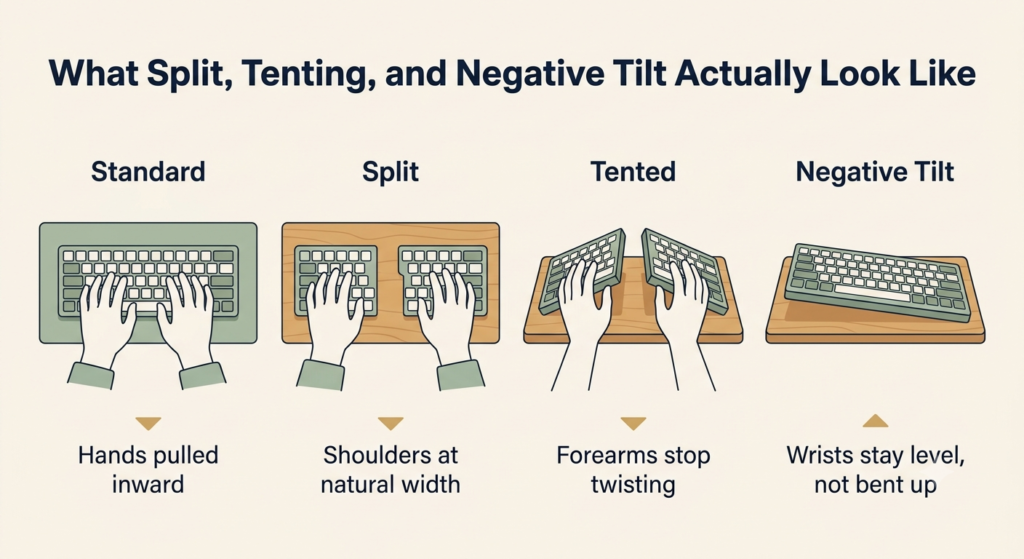
A split ergonomic keyboard divides the board into two halves, either fixed at a gentle angle or fully separable, so your hands and shoulders don’t have to pull inward toward the center the way they do on a single flat board — that inward pull is a common source of shoulder tension. Tenting raises the inner edge of each half so your palms face each other more than they face straight down. If you’re specifically dealing with a twisted, tired forearm, tenting is the mechanism built for exactly that — it’s what a keyboard for forearm pronation actually needs to have. A negative tilt keyboard angles the whole board so the front edge sits higher than the back, which keeps your wrists from bending upward — the opposite of what most keyboards do by default.
That last point is worth sitting with, because most keyboards ship with the rear feet extended, tilting the back of the keyboard up toward you. That’s positive tilt, and it does the opposite of what your wrists need: it bends them upward for hours at a time. Most people use it without knowing there’s an alternative, simply because it’s how the keyboard arrived out of the box.
One more thing worth clearing up: a mechanical switch changes how a key feels to press, not how your arm is positioned while you press it. A mechanical keyboard isn’t automatically an ergonomic one — plenty of gaming keyboards have excellent switches and terrible geometry.
Three keyboards, three different problems — no single one does everything at once. Match the mechanism to what’s actually bothering you: shoulders pulled inward (split), a twisted forearm (tenting), a bent wrist (negative tilt), or a mouse that’s always a reach away (compact layout without a numpad).
Match your discomfort to a mechanism
If you’d rather skip ahead, here’s the short version:
| What you notice | What may be contributing | Mechanism to look for |
|---|---|---|
| Shoulders or elbows pulled inward | Hands forced together on a single board | Split |
| Forearm feels twisted or tired | Palms facing flat down for hours | Tenting |
| Wrist bends upward while typing | Keyboard tilted toward you, often by default | Negative tilt |
| Mouse always feels a reach away | A wide keyboard, often with a numpad, pushing it out | Compact layout |
| Wrist feels lifted even with a wrist rest | Tall keys forcing your hand up | Low-profile |
Three keyboards, three different problems
No keyboard here does everything at once, and that’s worth knowing before you compare specs. The two split keyboards below each combine two of these mechanisms, but not the same two — neither includes all three. It’s the same logic behind choosing an ergonomic mouse: different designs solve different problems, and the honest answer is usually “it depends which mechanism you actually need,” not “buy the one with the most features.”
The easiest entry: adjustable tilt without relearning anything
If you want the shoulder and forearm relief of a split keyboard without any adjustment period, this is where to start — the curve is built in, so there’s nothing to configure before you can type normally.
Our pick: Logitech ERGO K860. The keyframe curves and splits in one fixed piece, so your hands land in a wider, gently tented position the moment you sit down — no assembly, no relearning where the keys are. What you can adjust is the tilt: legs at the back let you dial in 0, -4, or -7 degrees, so you can find negative tilt that actually keeps your wrists level instead of the positive tilt most keyboards ship with by default. The wrist rest is a genuine piece of engineering, not an afterthought — measured against a standard keyboard with no palm rest at all, Logitech’s own testing found 54% more wrist support and 25% less wrist bending, and the design carries a third-party certification from United States Ergonomics, not just an in-house claim. It comes with a full numpad built in, which means it doesn’t solve the other common complaint: a mouse that sits too far to the right.
What we like
- Zero learning curve: the split and tent are already shaped into the keyframe, so you type at full speed from the first minute instead of adjusting to a new layout.
- Real, adjustable tilt: three tilt settings let you find the angle that actually keeps your wrist level, correcting the positive-tilt default most keyboards ship with.
- A wrist rest backed by an outside certification: United States Ergonomics reviewed the design, which adds independent evaluation beyond the manufacturer’s own description.
What to keep in mind
- The split and tent are fixed: you get one angle, built into the keyframe — if you want to customize exactly how far apart or how tented your hands sit, this isn’t that keyboard.
- The built-in numpad keeps your mouse at arm’s length: all the shoulder and wrist relief here doesn’t change how far you have to reach sideways for your mouse.
It’s a strong first choice if you want relief without any adjustment period — but if your mouse reach is the bigger complaint, the MX Keys Mini addresses that specifically instead.
Logitech’s own testing found 54% more wrist support and 25% less wrist bending — verified by a third-party certification from United States Ergonomics, not just an in-house claim.
True adjustable positioning: split and tenting you dial in yourself
If the K860’s fixed angle doesn’t quite match your shoulders, or you’d rather keep adjusting until it does, this is the keyboard built for exactly that — nothing here is baked in.
Our pick: Kinesis Freestyle2 with the VIP3 tenting kit. Unlike a fixed split, the two halves connect by a cable and rotate or separate up to 9 inches apart, so you set the width to match your actual shoulder position rather than a manufacturer’s estimate of average. The VIP3 kit, pre-installed, adds three tenting heights — 5, 10, or 15 degrees — with cushioned palm supports built into the lifters, so you can raise the angle as your comfort with it grows. It uses a standard Windows layout, keys in the familiar places, so nothing about typing itself needs relearning. What it doesn’t offer is negative tilt — there’s no built-in way to angle the whole board forward — and like the K860, it includes an embedded numeric keypad, so it shares that same limitation: your mouse still sits a reach away.
What we like
- True custom positioning: the split width and tenting angle are both yours to set, rather than fixed at whatever a manufacturer decided suits most people.
- Cushioned palm support built into the tenting kit: the lifters that create the angle also support your wrists, instead of adding tenting at the cost of comfort.
- No layout to relearn: the keys sit where a standard keyboard’s keys sit, so typing speed doesn’t take a hit while you adjust the angle.
What to keep in mind
- No negative tilt: if wrist extension from the whole board angling toward you is your main complaint, this keyboard doesn’t address that specific mechanism.
- Also ships with a numpad: the reach to your mouse stays the same as a standard keyboard, the same limitation as the K860.
It’s the right pick if you want full control over width and tenting angle rather than a fixed compromise — but if wrist extension from tilt is your main complaint, neither this nor the K860 addresses that; check your keyboard’s tilt before adding either one.
When the problem is reach, not angle
If your shoulders and wrists feel fine but your arm is always stretching sideways for the mouse, neither of the keyboards above actually fixes that — this one does.
Our pick: Logitech MX Keys Mini. Dropping the numpad is most of the story here, and it’s the simplest way to reduce mouse reaching distance without changing anything about how you type: without that extra block of keys, the whole keyboard is narrower, so your mouse sits closer to your body and your shoulder doesn’t have to reach as far to the side. Logitech’s own description of the design is that it keeps your shoulders aligned specifically by shortening that reach. It’s genuinely thin, too, at 0.83 inches tall, thin enough to fall into the low-profile range that also tends to ease wrist extension, since your hand doesn’t have to lift as high to reach the keys. It’s worth being clear about what this doesn’t do: it isn’t split, and it doesn’t tent, so it won’t touch shoulder-width alignment or forearm pronation the way the other two keyboards do — its entire benefit is a shorter, straighter reach.
What we like
- A genuinely shorter reach to your mouse: losing the numpad isn’t just about desk space — it moves your whole arm closer to center, which is the actual mechanism at work.
- Thin enough to matter for your wrist too: at well under an inch tall, the low profile keeps your hand from lifting as high as it would on a standard keyboard.
- Battery life that stays out of the way: up to 10 days with the backlight on, or months with it off, so charging never becomes a reason to skip it.
What to keep in mind
- It’s not a split or tented keyboard: if shoulder alignment or forearm rotation is your main complaint, this won’t address either one.
- Backlighting and multi-device switching cost more than a basic keyboard: you’re paying for conveniences that aren’t strictly ergonomic, alongside the parts that are.
It’s the right choice when reach to your mouse is the actual complaint — but if your shoulders feel pulled inward or your forearm feels twisted, this alone won’t touch either mechanism; the K860 or Freestyle2 address those instead.
What the first weeks actually feel like
None of these three keyboards asks you to relearn where the keys are — that’s deliberate, since a columnar or concave layout can take weeks to get back to full typing speed on, and that’s a bigger commitment than most people are looking to make. The K860 and MX Keys Mini both type like a standard keyboard from the first minute, split or not.
The Freestyle2 is the one exception worth a heads-up. The keys themselves are familiar, but finding your ideal separation and tenting angle takes some actual trial: a few days of nudging the halves wider or raising the tent a notch, watching how your shoulders and wrists respond. It’s less an adjustment period and more a short calibration — most people settle into a comfortable setting after a handful of tries, not weeks of ongoing tweaking.
Frequently asked questions
Why do my wrists hurt when typing on a laptop?
A laptop’s keyboard sits flat and close to the trackpad, which tends to push your wrists into extension — bent upward at the base of your hand — for as long as you’re typing. Add a keyboard that ships with positive tilt by default, angled up toward you, and that bend gets worse instead of better.
How do I stop shoulder pain from typing?
Shoulder pain from typing is usually about width, not angle: a standard keyboard forces your hands and elbows inward toward the center, which pulls your shoulders forward with them. A split design, fixed or fully adjustable, lets your hands sit closer to natural shoulder width instead.
Why does reaching for my mouse cause shoulder pain?
A wide keyboard, especially one with a built-in numpad, pushes your mouse further to the side than it needs to be. Reaching sideways repeatedly loads the shoulder in a way that adds up over a full workday, even if each individual reach feels small.
Is a low profile keyboard better for wrist pain?
It can help with one specific kind of wrist pain: extension caused by your hand sitting too high above the keys. A low-profile design shortens that lift, but it won’t do anything for pain caused by a twisted forearm or hands forced too close together — those need tenting or split, not a shorter keyboard.
How do I know if I need a split keyboard?
If your shoulders or elbows feel tight or pulled inward by the end of a work session, and that’s separate from any wrist or forearm discomfort, a split keyboard is worth trying. It’s less useful if your main complaint is specifically about wrist angle rather than shoulder width.
Should an ergonomic keyboard be tilted up or down?
Down, or more precisely, angled so the front edge is higher than the back — that’s negative tilt, and it keeps your wrist level instead of bent upward. Most keyboards ship the opposite way by default, tilted up toward you, which is worth checking and correcting rather than assuming is already fine.
The Bottom Line: The Keyboard You Need Depends on the Mechanism
Start with whichever mechanism matches your actual discomfort, not the keyboard with the longest feature list. If your shoulders feel pulled in, try a split design. If your forearm feels twisted, look for tenting. If your wrist bends upward no matter what, check your tilt before buying anything at all — you might already own a keyboard that just needs its feet adjusted. And if your arm is doing all the work reaching for your mouse, the fix might not be about angle at all, just less keyboard in the way.
One honest caveat before you decide: a wrist rest can make any of these more comfortable during pauses, but it won’t fix the wrong mechanism — supporting your palm on a keyboard that’s still pulling your shoulders inward addresses your wrist, not the shoulder pull that’s actually driving the discomfort. If that’s genuinely your situation, using one correctly during typing pauses is worth getting right on its own — a complement to choosing the right design here, not a substitute for it.
If none of these three match your exact discomfort, you can browse more ergonomic keyboards using the same rule: match the mechanism to what’s actually bothering you, not the other way around.
RELATED GUIDES
Wrist Rest for Keyboard and Mouse
A wrist rest can make any of these more comfortable during pauses, but it won’t fix the wrong mechanism on its own.
Read the Guide →How to Choose an Ergonomic Mouse
The same logic applies — different shapes solve different problems, not one “most ergonomic” option.
Read the Guide →About This Guide
This guide helps you choose an ergonomic keyboard based on the specific problem you’re trying to solve — whether that’s shoulder tension, forearm twisting, wrist extension, or reaching too far for your mouse. Instead of treating every ergonomic design as the same, it explains what split layouts, tenting, negative tilt, and compact designs actually change, so you can match the keyboard to your own setup before buying.
It’s researched and edited by César Cervantes González (Cerlez) using verified manufacturer specifications and independent reviews rather than hands-on testing.