

🕐 8 MIN ESTIMATED READ TIME
A wrist rest for keyboard and mouse sounds like one product category, but it isn’t — your hands do completely different things at each one, and a support that helps at the keyboard can be the wrong shape entirely for the mouse. This guide keeps things simple: what to look for in each, how to actually use the thing once you own it, and four honest picks — plus one case where you probably don’t need to buy anything at all.
Table of Contents
Affiliate Disclosure: This post contains affiliate links. We may earn a small commission at no extra cost to you. Availability is subject to change—please check the product links for current details.
The set at a glance
| If this is your setup | Consider |
|---|---|
| Slim or laptop-style keyboard | Kensington ErgoSoft Wrist Rest |
| Standard or mechanical keyboard | HyperX Wrist Rest |
| Standard mouse | Kensington Duo Gel Mouse Pad |
| Large mouse or large hands | Gimars Large Mouse Pad Wrist Rest |
Why keyboard and mouse need different wrist support
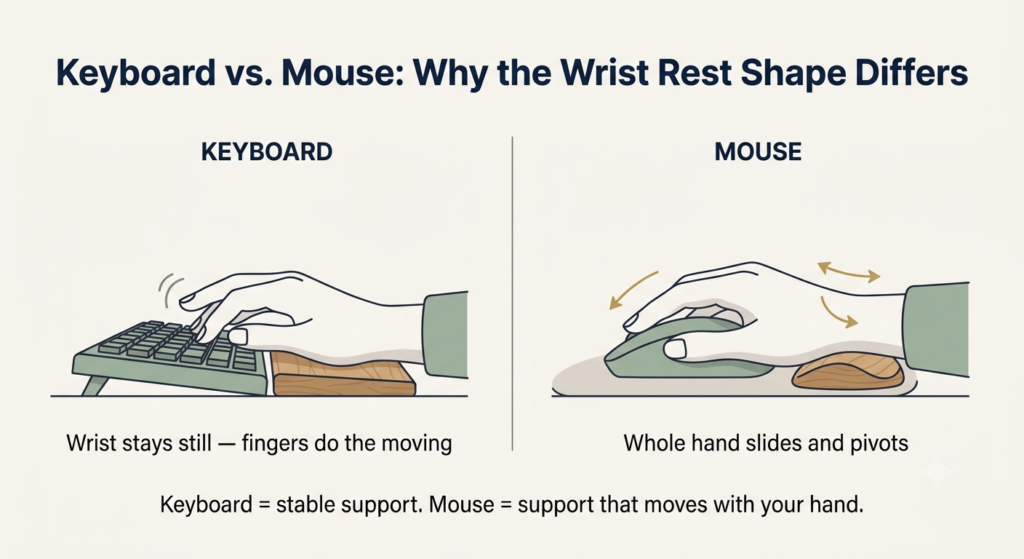
At a keyboard, your wrist mostly stays still — the support just needs to keep it level while your fingers do the moving. A mouse is different: your whole hand slides and pivots as you move the cursor, so real mouse wrist rest ergonomics call for a curved, contoured shape that moves with your hand, not a flat bar in the same shape as a keyboard rest. That’s the one thing most “best wrist rests” lists get wrong — they treat both as the same product, when the shape each one needs is genuinely different.
How to actually use a wrist rest
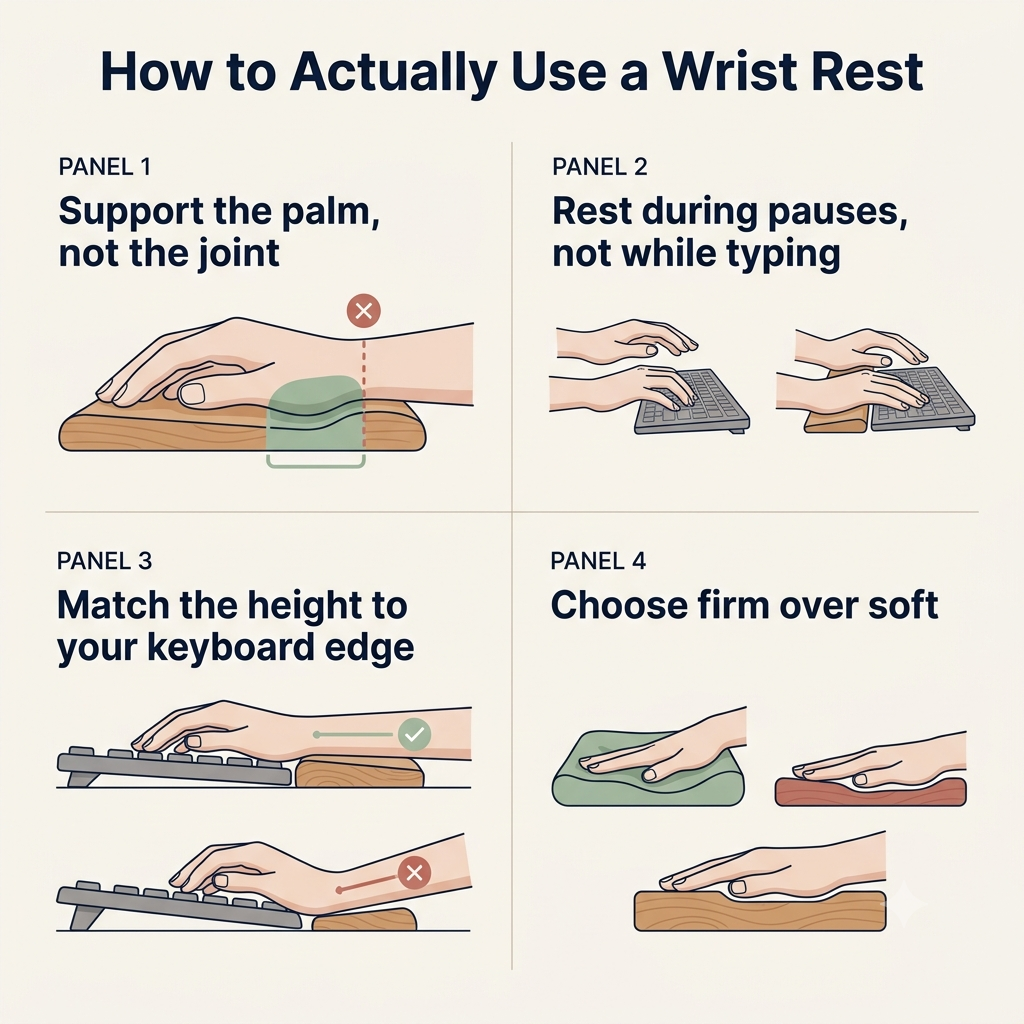
Where to place a wrist rest for a keyboard matters as much as which one you buy. A wrist rest is easy to use badly, and doing that can undo the point of owning one. Four things matter more than the material or the brand:
- Support the heel of your palm, not the wrist joint itself. Pressure right on the wrist is pressure right where carpal tunnel symptoms start — the pad should sit under the fleshy base of your hand, further back than most people place it.
- Use it during pauses, not while you’re actively typing. Your hands should float slightly as you type; resting your wrists on the pad while your fingers move forces them into an upward bend that adds strain instead of removing it.
- Match the height to your keyboard’s front edge. This is the whole point of proper wrist rest height for a laptop or any low-profile keyboard — if the pad sits higher or lower than that edge, your wrist bends to reach it either way.
- Choose firm over soft. In the debate of firm vs soft wrist rest, firmer wins: a pad that lets your hand sink in feels plush at first but stops supporting the neutral position it’s supposed to hold.
A wrist rest only fixes what happens at your hands — the rest of your posture is its own set of practical habits worth getting right.
Keyboard wrist rests
Two situations cover most keyboards: the low, thin profile of a keyboard made for laptops, and the taller profile of a standard or mechanical keyboard. Getting the height right for whichever one you have matters more than any other spec.
Best for low-profile and laptop keyboards
Our pick: Kensington ErgoSoft Wrist Rest for Slim Keyboards. This one is built around a single number: it’s designed for keyboards with a front edge under 0.39 inches, which describes almost every slim external keyboard sold for laptop use. That match matters more than the padding itself — a wrist rest that’s taller than your keyboard’s edge tilts your wrist up no matter how soft it feels.
What we like
- Built for slim keyboards specifically: it’s sized for the low-profile keyboards most laptop users pair with a stand, not a generic height that happens to work sometimes.
- Gel-cushioned support: stays comfortable through a full workday without feeling like a hard shelf under your palm.
- Non-skid backing: stays where you put it instead of sliding away mid-task, which defeats a wrist rest’s whole purpose.
What to keep in mind
- Won’t work with a taller keyboard: switch to a mechanical or standard-height keyboard later, and this pad no longer matches the front edge — the mismatch reintroduces the exact wrist bend it’s meant to ease.
- The exact thickness isn’t published: Kensington states which keyboards it’s compatible with rather than the pad’s own measurements, so you’re matching by their compatibility claim rather than a number you can verify yourself.
Best for: anyone with a slim or laptop-style external keyboard under 0.39 inches at the front edge.
Not the right fit if: you switch to a mechanical or standard-height keyboard later — the height match no longer applies.
It’s designed for keyboards with a front edge under 0.39 inches — a match that matters more than the padding itself.
Best for standard and mechanical keyboards
Our pick: HyperX Wrist Rest. At 22mm thick, this sits noticeably higher than a slim laptop-keyboard rest, which is exactly right for a standard or mechanical keyboard’s taller front edge. The gel-infused memory foam keeps its shape under sustained pressure instead of flattening out after a few weeks, and the compact-length version keeps it sized to a tenkeyless or smaller board rather than overhanging the desk.
What we like
- Matches a taller keyboard’s actual height: 22mm keeps your wrist level with keyboards that sit higher off the desk, instead of forcing it upward.
- Holds its shape over time: gel-infused memory foam resists the flattening that turns cheaper foam pads into a thin, useless layer after a few months.
- Backed by a large base of real use: over 16,000 reviews at a strong average is a genuine signal this holds up beyond the first week.
What to keep in mind
- Too thick for a slim keyboard: the same 22mm that’s right for a mechanical board will tilt your wrist upward if you pair it with a low-profile laptop keyboard instead.
- Sized for one keyboard width: the compact length fits tenkeyless and smaller boards; a full-size keyboard will overhang the edges.
Best for: anyone with a standard or mechanical keyboard whose taller front edge needs the extra 22mm of height.
Not the right fit if: your keyboard is slim or laptop-style — the same thickness that helps here will tilt your wrist upward on a lower-profile board.
If your keyboard itself is the real problem — not just needing somewhere to rest your wrists — a wrist rest can’t fix a bad typing angle on its own, and it’s worth looking at keyboards built for the job instead.
Mouse wrist rests
Mouse support has its own two situations: a standard-size mouse, and a larger or wider one where your palm needs more surface to land on.
Best for standard mice
Our pick: Kensington Duo Gel Mouse Pad. The gel pillow is molded to the natural curve of a resting hand, rather than a flat surface, which is the shape a mouse rest actually needs since your hand pivots as you move. At an inch tall, it sits low enough to match most mice without tilting your wrist upward.
What we like
- Curved to match how a hand actually rests: the contour supports your palm through the mouse’s full range of motion, not just when your hand is dead center.
- Stays cool through long sessions: a built-in ventilation channel keeps the gel from turning warm and sticky the way solid foam can by the afternoon.
- Low profile at one inch: sits close to standard mouse height instead of propping your wrist up above it.
What to keep in mind
- Sized for a standard mouse: a larger or wider mouse can outgrow the pad’s contour, leaving part of your palm unsupported.
- The mousing surface itself is compact: at 9.6 by 7.6 inches, it’s sized around the wrist rest, not for extended mouse travel — if you play or work at low sensitivity and need a lot of physical space to move the mouse, the pad runs out before your hand does.
Best for: anyone with a standard-size mouse and hand who wants a low-profile, curved rest.
Not the right fit if: you have a larger mouse or hand, or you need a lot of physical desk space to move the mouse at low sensitivity.
Best for large mice
Our pick: Gimars Large Mouse Pad Wrist Rest. At 11 by 8.26 inches, the surface runs noticeably larger than a standard pad, which matters more than it might sound: a bigger hand or mouse needs more room to move without sliding off the edge mid-motion, and running out of surface forces an awkward correction that undoes any support the rest was providing.
What we like
- More room to move: the enlarged surface keeps a large hand or mouse from sliding off the edge during normal use, avoiding the awkward mid-motion correction that a too-small pad forces.
- Slow-rebound memory foam: shapes to your hand’s resting position instead of pushing back against it, the way firmer foams can.
- Grips the desk securely: a natural rubber base with a grooved texture keeps the whole pad from creeping during fast or repeated mouse movement.
What to keep in mind
- Takes up real desk space: the larger footprint is the whole point, but it won’t fit a cramped desk or a small coworking table as easily as a standard-size pad.
- Not built for a standard-size hand: if your hand and mouse are already average-sized, the extra surface is space you don’t need, not an upgrade.
Best for: anyone with a larger hand or mouse who needs more surface to avoid sliding off the edge mid-motion.
Not the right fit if: your hand and mouse are already standard-sized — the extra surface is space you don’t need.
Do you need one for a vertical mouse?
Probably not, and that’s worth saying plainly rather than selling you a product anyway. A vertical mouse uses a handshake grip specifically so your forearm can rest naturally on the desk without twisting your wrist flat — that’s the entire point of its design. Adding a wrist rest on top of that can force your hand back into a flatter angle, working against the exact thing you bought the mouse to fix. If your hand or wrist still complains with a vertical mouse, the more likely fix is the mouse itself, not an add-on —choosing the right shape for your grip and hand size is worth a closer look.
Frequently asked questions
Do wrist rests actually help with carpal tunnel?
They can help reduce postures that contribute to it, but they don’t cure or prevent carpal tunnel syndrome on their own. Support in the wrong spot — right on the wrist joint instead of the palm — can add pressure rather than relieve it, so how you use one matters as much as owning one.
Should you use a wrist rest while typing or resting?
Resting. Your hands should float slightly while you actively type, with the wrist rest supporting your palms during pauses between bursts of typing — not bearing weight the whole time your fingers are moving.
How thick should a keyboard wrist rest be?
As thick as your keyboard’s front edge is tall, and no more. A rest that’s taller than that edge tilts your wrist upward instead of keeping it level, which defeats the purpose regardless of how comfortable the padding feels.
Is memory foam or gel better for ergonomic support?
Both work well as long as the piece holds its shape under sustained pressure. What matters more than the material name is firmness: a pad soft enough to let your hand sink in loses the alignment it’s supposed to maintain, whichever filling it’s made from.
The Bottom Line: Alignment Over Softness
A wrist rest for keyboard and mouse isn’t one purchase, it’s two decisions — and getting the height and shape right for your specific setup matters more than the material, the brand, or how plush it feels in the store. Match the keyboard rest to your keyboard’s actual height, match the mouse rest to your hand size, and skip it entirely if a vertical mouse already has you covered.
If none of these four match your exact setup, you can browse more wrist rest options — just keep the same rule in mind: match the height, not the softness.
RELATED GUIDES
How to Improve Your Posture While Working on a Laptop
A wrist rest only fixes what happens at your hands — the rest of your posture is its own set of habits.
Read the Guide →How to Choose an Ergonomic Keyboard
If the keyboard itself is the real problem, a wrist rest can’t fix a bad typing angle on its own.
Read the Guide →About This Guide
The purpose of this guide is to help you choose and use the right wrist rest for your keyboard and mouse, so it actually improves comfort instead of adding strain. Rather than treating both as the same product, it looks at each one separately because they support different tasks.
It’s researched and edited by César Cervantes González (Cerlez) using verified manufacturer specifications and independent reviews rather than hands-on testing.