
🕐 9 MIN ESTIMATED READ TIME
Search for the best laptop stand for home office use and you’ll get results mixed in with foldable travel stands, $20 risers, and posture-correction devices — as if someone shopping for a permanent desk setup wants the same thing as someone packing for a flight. They don’t. People searching for the best laptop stands for desk work are usually trying to solve exactly this: something that holds up under daily use, not something optimized for a suitcase.
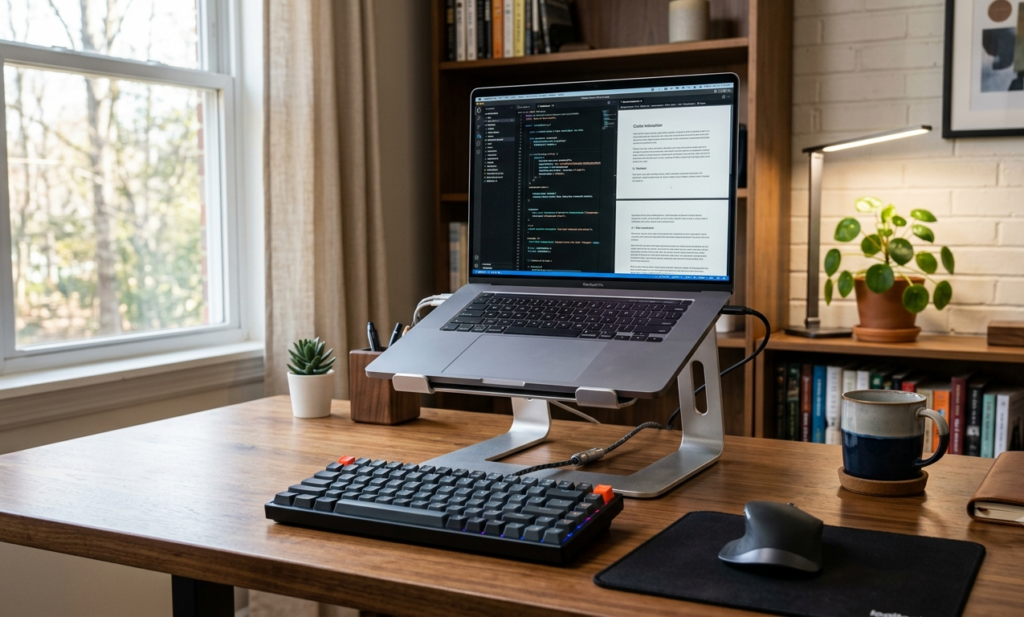
This guide is specifically for the stand that’s going to live on your desk, every day, holding up your laptop while you type on an external keyboard for hours at a time. That’s a different set of requirements than folding flat for a backpack or hitting a rock-bottom price point. Here, what matters is whether the thing stays solid under daily typing pressure, whether it’s built to last years rather than months, and whether it actually fits into how you work.
Table of Contents
Affiliate Disclosure: This post contains affiliate links. We may earn a small commission at no extra cost to you. Availability is subject to change—please check the product links for current details.
What actually matters for a stand that lives on your desk
A stand that stays on your desk permanently has a different job than one that travels. It needs to hold steady while you type with real force on an external keyboard, not just while you glance at the screen. It needs to survive years of the same small adjustments, not just a few trips in a bag. And it needs to fit into a setup that already includes a keyboard, a mouse, and probably a monitor or two — not just balance a laptop on its own.
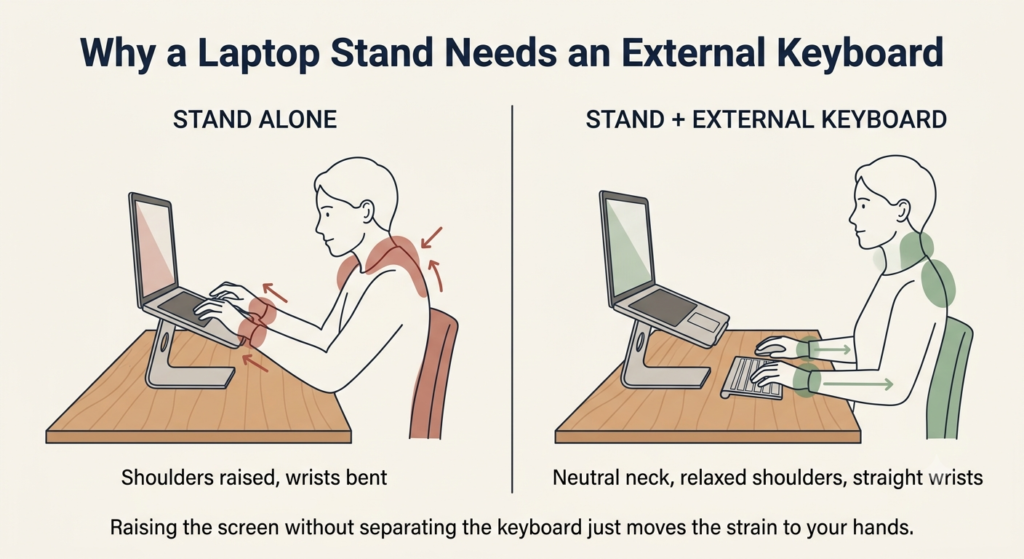
Stability under daily typing pressure matters more than almost anything else here. A stand that wobbles when you type defeats its own purpose, because the actual point of raising your screen is pairing it with an external keyboard and mouse so you’re looking at the screen straight ahead instead of down at it — the reasoning behind that pairing is covered in the guide how to improve your posture while working on a laptop. A stand that shifts or flexes while you work undermines that pairing before it has a chance to help.
Build quality is what determines whether a sturdy laptop stand for office desk use today still feels sturdy three years from now. A single piece of forged or machined aluminum has no joints to loosen over months of daily use. A stand built from multiple hinged parts can still be excellent, but it depends entirely on how well those joints are engineered — cheap hinges wear loose; well-made ones don’t.
Adjustment is worth paying for only when you’ll actually use it. If your desk height and seating never change, a fixed stand that does one thing well can be more reliable than an adjustable one with more parts to eventually loosen. If you switch chairs, share a desk, or just like to change position through the day, real adjustability earns its keep.
Finally, think about integration: how much desk space the stand takes up, whether it manages cables instead of leaving them tangled underneath, and whether it plays well with a monitor or a second screen you already have.
Three stands, three different construction philosophies — all built to live on your desk permanently, not to travel. Match the stand to what matters most: zero moving parts to loosen (mStand), real height adjustment without losing stability (iLevel2), or your whole desk surface back (Mount-It Arm).
Match your setup to a stand
If you’d rather skip ahead to which ergonomic laptop stand for desk use fits your situation, here’s the short version:
| What you want | Stand to consider |
|---|---|
| The simplest, most solid option, with nothing to adjust | Rain Design mStand |
| The same stability, with real height adjustment | Rain Design iLevel2 |
| Your whole desk surface back, with the most range of motion | Mount-It! Laptop Desk Mount Arm |
Three stands, three ways to stay stable
None of these three is chasing the same goal by the same method. They’re three different construction philosophies aimed at the same outcome: a laptop that stays exactly where you put it, every day, for years.
The simplest, most solid option
If you want the fewest possible things that could go wrong, a stand with zero moving parts is hard to beat — there’s nothing to adjust, nothing to loosen, nothing to eventually wobble.
Our pick: Rain Design mStand. It’s machined from a single piece of aluminum, which means there are no joints or hinges anywhere in the design to work loose after years of daily use — the same solid block that holds your laptop also acts as a heat sink, pulling warmth away from the bottom of the machine while it runs. A hole built into the back routes your charging cable and any other wires out of sight instead of leaving them draped across the desk. It’s a genuinely permanent piece, not something you reposition day to day, which is precisely the point for a desk where the laptop lives all the time. The trade-off for that simplicity is fit: it’s built for laptops with a depth under 10.4 inches, which covers most MacBooks and many 14-inch PC laptops, but rules out larger or deeper models.
What we like
- Nothing to loosen over time: the single-piece construction means there’s no hinge or joint to eventually wobble, unlike stands built from several moving parts.
- Doubles as a cooling surface: the aluminum body pulls heat away from your laptop instead of trapping it against a hot desk surface.
- Cables stay out of the way: the built-in routing hole keeps your charging cable from draping across the desk in full view.
What to keep in mind
- No adjustment at all: the height and angle are fixed, so if your desk or chair height ever changes, the stand doesn’t follow.
- Limited to laptops under 10.4 inches deep: larger or deeper laptops simply won’t fit, so it’s worth measuring your laptop before buying.
Best for: anyone whose desk height and seating never change, who wants the fewest possible things that could go wrong.
Not the right fit if: your laptop is deeper than 10.4 inches, or your setup changes often enough that fixed height would frustrate you.
The same stability, with real adjustment
If the idea of a fixed stand appeals to you, but you know your setup will change — a different chair, a shared desk, working from different spots some days — what you want is an adjustable laptop riser for desk use that doesn’t give up the stability of a fixed one.
Our pick: Rain Design iLevel2. It shares the mStand’s core idea of living permanently on your desk rather than folding away, but a slider on the front panel lets you raise or lower the screen on the spot, without tools or reassembly. Rubber pads protect both your laptop and your desk surface from the aluminum body, and the same tilt that helps bring the screen closer to eye level also helps heat escape from underneath the laptop. Unlike the mStand, it’s built to fit laptops of any size, without a depth restriction — a genuine trade-off in its favor if your laptop runs larger. What isn’t specified anywhere in its listing is a weight capacity, so if you’re working with an especially heavy laptop, that’s worth confirming directly before you buy.
What we like
- Real height adjustment without disassembly: the front slider lets you change position in seconds, useful if your desk setup shifts through the day or across different users.
- Fits any laptop size: unlike a fixed-depth stand, there’s no size restriction ruling out larger laptops.
- Doubles as a cooling surface too: the tilt and aluminum body help heat escape from underneath the laptop, the same benefit as its fixed sibling.
What to keep in mind
- No stated weight capacity: if your laptop is unusually heavy, it’s worth confirming its limits directly rather than assuming.
- More moving parts than the mStand: the slider mechanism is well-built, but it’s still one more mechanism than a stand with none at all.
Best for: anyone who wants the mStand’s stability with real height adjustment, especially if your setup changes or your laptop runs larger.
Not the right fit if: you’re working with an unusually heavy laptop — confirm the weight capacity directly before buying.
When you want your whole desk back
Both stands above sit on your desk surface, which is a fine trade for their stability — but if desk space itself is what you’re short on, or your laptop is heavy enough that you need a genuinely heavy duty laptop holder, a mounted arm solves a different problem entirely.
Our pick: Mount-It! Laptop Desk Mount Arm. Rather than resting on the desk, it clamps to the edge — or mounts through a grommet hole — so the entire surface underneath stays clear for anything else you need there. A gas spring makes height adjustment smooth rather than requiring you to loosen and retighten a knob, and the arm swivels a full 360 degrees with a wide tilt range, which is real flexibility, not a marketing bullet point. At 22 pounds of rated capacity, it holds up laptops the two stands above weren’t built for, and the steel-and-aluminum construction is heavier than either — 9.2 pounds on its own — which is exactly what gives it that capacity rather than being a downside. Cable clips along the arm keep charging and monitor cables organized instead of hanging loose. This is still very much a fixed-desk solution, not a general-purpose stand — it’s built to be mounted once and left there, which fits the same daily-use philosophy as the other two, just through a different mechanism.
What we like
- Frees your entire desk surface: since it clamps to the edge instead of sitting on top, the space underneath stays available for anything else.
- Handles heavier laptops with room to spare: 22 pounds of rated capacity covers laptops that would be a stretch for a simple riser.
- The widest range of motion of the three: full swivel and a wide tilt range let you fine-tune the exact position, not just the height.
What to keep in mind
- Requires mounting to your desk: the clamp or grommet installation means it’s not something you casually reposition once it’s set up.
- Heavier and bulkier than a riser: at over 9 pounds, it’s a more substantial piece of hardware than either Rain Design stand, which is part of what gives it its capacity.
Best for: anyone who’s short on desk space, or whose laptop is too heavy for a simple riser.
Not the right fit if: you want something you can casually reposition — this is built to be mounted once and left there.
At 22 pounds of rated capacity and a full 360-degree swivel, it holds up laptops the two stands above weren’t built for.
Frequently asked questions
How stable are adjustable laptop stands for daily desk work?
Genuinely stable ones hold their position under real typing pressure and don’t drift or sag over months of use — the adjustment mechanism itself is what separates a good one from a mediocre one. A slider or knob built into solid metal construction tends to hold up; thin, lightweight adjustable joints are more likely to loosen with daily use.
Do I need an external keyboard if I use a laptop stand on my desk?
Yes, in practice. Raising your laptop’s screen also raises its built-in keyboard out of comfortable typing reach, so a stand only delivers its full benefit when paired with an external keyboard and mouse. Using a raised laptop with its own keyboard for long sessions defeats much of the purpose.
What features make a laptop stand suitable for long working hours?
Stability under typing pressure, solid build quality that won’t loosen over time, and a comfortable eye-level height are the core three. Beyond that, cable management and desk-space efficiency matter more the longer the stand stays part of your daily setup.
How much weight can a heavy-duty desk laptop stand support?
It varies by design. Simple aluminum risers often don’t publish a specific weight limit, relying instead on a depth or size compatibility range, while mounted arms typically state an exact capacity — commonly in the 15 to 25 pound range for options built with laptops specifically in mind.
Should I get a fixed riser or a fully adjustable laptop stand for my home office?
If your desk height, chair, and posture stay consistent day to day, a fixed riser is simpler and has fewer parts to eventually wear. If you share a desk, switch positions through the day, or expect your setup to change, the extra cost of adjustability tends to pay for itself.
The Bottom Line: Match the Build to Years of Daily Use
The best laptop stand for home office use isn’t a travel accessory, and it isn’t the cheapest option that happens to hold a laptop up — it’s a small piece of infrastructure you’ll rely on every working day for years, which is exactly why stability and build quality matter more here than they would for a stand you only use occasionally. Whichever of these three you choose, you’re choosing based on how much adjustment you actually need and how much desk space you want back, not settling for whatever was lightest or least expensive.
If none of these three quite match what you need, you can browse more laptop stands using the same rule: match the build to years of daily use, not to a single afternoon of shopping.
RELATED GUIDES
Best Portable Laptop Stand
For a setup that needs to travel with you instead of staying at one desk.
Read the Guide →Best Laptop Stand for Neck Pain
If neck pain specifically, not general stability, is what’s driving your decision.
Read the Guide →Laptop Stand + Keyboard + Mouse
A stand only delivers its full benefit paired with external input devices — this covers the full system.
Read the Guide →How to Improve Your Posture on a Laptop
The full reasoning behind why raising your screen and separating your keyboard matters.
Read the Guide →About This Guide
This guide helps you choose the right laptop stand for a permanent home office setup by matching different desk needs to the right type of stand. Instead of comparing every stand on the market, it focuses on the factors that matter for everyday work — stability, adjustability, durability, and desk space — so you can choose a stand that fits how you actually work, rather than how you travel.
It’s researched and edited by César Cervantes González (Cerlez) using verified manufacturer specifications and independent reviews rather than hands-on testing.