

🕐 8 MIN ESTIMATED READ TIME
No collapsible laptop stand does everything well. The lightest ones barely lift your screen. The most stable ones aren’t the lightest. The ones that fold flattest aren’t necessarily the ones that fold fastest. Every option here trades one thing for another — there’s no single best portable laptop stand, just the trade-off that fits how you work.
This is the deep-dive on portable stands specifically — not a fixed desk setup, and not a full travel kit with keyboard and mouse included. A stand that never leaves your desk has different priorities entirely — see our home office stand guide if that’s your situation instead.
Table of Contents
Affiliate Disclosure: This post contains affiliate links. We may earn a small commission at no extra cost to you. Availability is subject to change—please check the product links for current details.
The real trade-off with any portable stand
Every portable stand is built around five things that pull against each other: weight, folded size, stability, how much it actually raises your screen, and how much friction there is in setting it up and putting it away. Improve one, and at least one other usually gets worse. A stand light enough to forget you’re carrying it rarely raises your screen much. A stand stable enough to type hard on a wobbly café table is rarely the lightest thing in your bag.
That friction piece matters more than people expect. A stand that’s technically light but takes two minutes to unfold and align isn’t actually convenient if you’re setting up and packing away three times a day between meetings and coffee runs. The real question isn’t which stand is lightest or most stable in isolation — it’s which trade-off matches how often you move, where you work, and what you’re willing to give up.
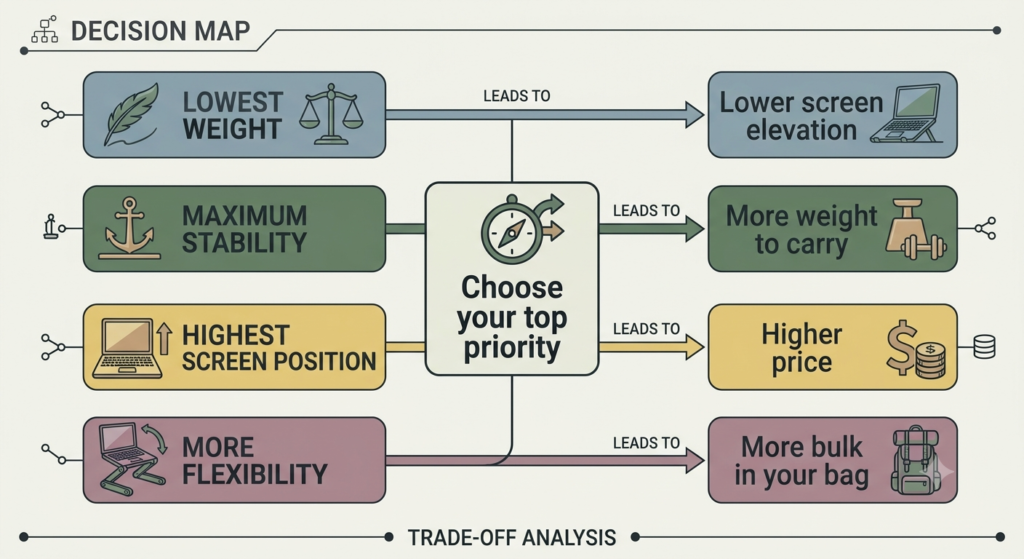
Four stands, four different trade-offs — none does everything well. Match the trade-off to how you actually work: near-zero weight always attached (MOFT Adhesive), stability on rough surfaces (Lamicall), maximum flexibility to sit or stand (MOFT Z), or maximum elevation for frequent travel (Roost V3).
Match your trade-off to a stand
If you’d rather skip ahead, here’s the short version:
| What you’re prioritizing | What you’re accepting | Stand to consider |
|---|---|---|
| Near-zero weight, always attached | Limited elevation | MOFT Adhesive |
| Stability on rough surfaces, larger laptops | Less portability | Lamicall |
| Maximum flexibility, sit or stand | The most weight of the three | MOFT Z |
| Maximum elevation, frequent travel | Higher price | Roost V3 |
Four stands, four different trade-offs
Each of these earns its place by being genuinely good at one thing, not adequate at everything.
Roost V3 is the reference point for this whole category — the stand most frequent travelers compare everything else against. It folds down to roughly the size of a pen, weighs next to nothing, and still lifts a laptop screen close to true eye level, which none of the three below fully manage. That combination comes at a real cost, both in price and in the fact that it’s built purely as a riser — you’ll want an external keyboard and mouse alongside it, not the laptop’s own. The stand alone is just one piece of that puzzle — pairing it with the right keyboard and mouse for travel is what our ergonomic laptop setup for travel guide actually walks through.
Ultralight and always-attached
If carrying anything extra feels like a burden, or you’ve abandoned stands before because you kept forgetting to pack them, the answer might be one that never gets packed at all.
Our pick: MOFT Adhesive Laptop Stand. Few options qualify as a genuinely lightweight laptop stand the way this one does — at 87 grams, it’s light enough to stop noticing, and it stays permanently attached to the bottom of your laptop, so there’s nothing separate to remember, lose, or leave behind. It folds flat into a single thin piece when not in use and pops into position in about a second. The honest trade-off is elevation: at 15° or 25°, it lifts your screen 2 to 3 inches, noticeably better than flat on the table but well short of true eye level. It’s also built for laptops without bottom ventilation — if yours vents through the base, the adhesive mount isn’t a fit.
What we like
- Genuinely forgettable weight: at 87 grams, it doesn’t register as something you’re carrying, let alone packing.
- Nothing extra to manage: since it stays attached to the laptop itself, there’s no separate piece to remember or lose.
- Instant setup: flipping it into position takes about a second, with nothing to align or adjust.
What to keep in mind
- Limited real elevation: 2 to 3 inches helps, but it won’t get your screen to true eye level the way a taller stand can.
- Not for laptops with bottom vents: the adhesive mount is built for a flat, unvented underside.
Best for: anyone who’s abandoned stands before because they forgot to pack them, or wants zero extra weight to think about. Not the right fit if: your laptop vents through the bottom, or you need your screen closer to true eye level.
At 87 grams, it’s light enough to stop noticing — and it stays permanently attached to the bottom of your laptop, so there’s nothing separate to remember, lose, or leave behind.
Stable enough for a shaky café table
If you’ve ever had a stand shift or wobble mid-sentence on an uneven table, stability probably matters more to you than shaving off another ounce.
Our pick: Lamicall (10″–17.3″). This is what a genuinely sturdy portable laptop stand looks like: its base is deliberately larger and heavier than most portable options, specifically so it doesn’t shift or slide while you type with real force — that weight is the whole point, not an oversight. The aluminum build also handles larger laptops most lighter stands can’t, comfortably covering a portable laptop stand for 16 inch laptop needs and up to 17.3 inches overall, and it doubles as a heat sink with built-in ventilation. A 360-degree rotating base lets you turn the screen to share it in a meeting without picking up the whole laptop. The trade-off is straightforward: it’s less portable than the other two picks here, heavier and bulkier to carry, in exchange for a base that genuinely doesn’t move.
What we like
- A base built specifically not to move: the extra weight isn’t incidental — it’s what keeps the stand planted while you type hard on an uneven surface.
- Fits larger laptops: up to 17.3 inches, wider compatibility than most portable options.
- Doubles as a heat sink: the aluminum body and ventilation holes help keep the laptop cooler than a flat table would.
What to keep in mind
- The least portable of the three: the same weight that gives it stability makes it bulkier to carry than the other picks here.
- Overkill if your desk barely moves during the day: its strengths matter most on rough or shared surfaces, less so if you’re mostly stationary once you sit down.
Best for: anyone who types with real force on unpredictable surfaces like café tables or shared desks.
Not the right fit if: your desk barely moves during the day — its strengths matter most on rough or shared surfaces.
Built to do more, not just less
If you switch between sitting and standing through the day, or want more than one viewing angle depending on the task, the right trade-off isn’t about shedding weight — it’s about a stand that does more, even if that means carrying more.
Our pick: MOFT Z. At 890 grams, it’s the heaviest of the three stands reviewed here — worth saying plainly, not softening. What that weight buys is real: four distinct sitting angles plus a genuine standing mode that lifts your laptop to 10 inches, all held up by a triangular base built specifically for stability, not just folding. It’s a different trade-off than the Lamicall’s — both accept extra weight, but the Lamicall spends it on staying still on a rough table, while the MOFT Z spends it on doing more things in more positions. Folded, it’s still slim enough to slide into a laptop sleeve, which is where its identity as a compact laptop stand for backpack use actually shows up, not in its weight.
What we like
- Genuine standing mode, not just tilted sitting: the 10-inch standing height is a real option for breaking up a seated day, not a marketing bullet.
- Four sitting angles cover real differences in task: typing, using a separate keyboard, or just browsing each get their own angle instead of one compromise position.
- Slides into a laptop sleeve despite the weight: the folded profile is slim enough to travel alongside your laptop, not as a separate bulky item.
What to keep in mind
- The heaviest pick here: at 890 grams, it’s a real weight to notice in a bag, especially compared to the MOFT Adhesive.
- More setup than a simple riser: switching between its several modes takes a bit more handling than a stand with one fixed position.
Best for: anyone who switches between sitting and standing through the day, or wants more than one viewing angle.
Not the right fit if: weight is your top priority — at 890 grams, it’s the heaviest of the four.
Frequently asked questions
How do I choose a portable laptop stand?
Start with what you do most often, not with a spec sheet. If you’re setting up and packing away multiple times a day, weight and setup speed matter most. If you’re typing hard on unpredictable surfaces — café tables, hotel desks — stability matters more than shaving grams. If you switch between sitting and standing, versatility is worth the extra weight. Match the trade-off to your actual routine, not to whichever stand has the most impressive spec on paper.
Are foldable laptop stands sturdy enough to type on?
Most are sturdy enough to hold a screen steady for viewing, but typing directly on a laptop’s own keyboard while it’s elevated is where wobble becomes obvious — the force of typing is what exposes any flex in a folding mechanism. That’s part of why raising the screen works best paired with an external keyboard and mouse— the same three-piece logic our laptop stand, keyboard, and mouse setup guide is built around.
What should I prioritize: weight or stability in a portable laptop stand?
It depends on where you’ll actually use it. If you mostly work at a stable desk that just happens to change locations — different offices, a home desk one day and a coworking desk the next — weight matters more, since the surface itself is rarely the problem. If you regularly work on café tables, small hotel desks, or other surfaces you don’t control, stability usually matters more, since an unstable base undermines the stand’s whole purpose.
Will a portable stand fit a heavy gaming laptop?
It depends on both size and weight capacity, which don’t always move together. The Lamicall’s 17.3-inch compatibility covers most gaming laptops by size, and its heavier base is generally better suited to a heavier machine than an ultralight option like the MOFT Adhesive, which is built with slimmer, lighter laptops in mind.
Does it work on uneven café tables?
It depends heavily on which stand. A lightweight, minimal-contact option like the MOFT Adhesive will wobble along with whatever surface it’s on, since it doesn’t add its own stability — the Lamicall’s heavier, wider base is specifically built to resist that kind of wobble, and the MOFT Z’s triangular base falls somewhere in between.
The Bottom Line: The Trade-Off You’re Willing to Make
There’s no single best portable laptop stand — there’s the one that matches the trade-off you’re actually willing to make. If you never want to think about packing a separate item, the MOFT Adhesive disappears into your routine. If stability on unpredictable surfaces matters more than shaving weight, the Lamicall is built for exactly that. If you want real flexibility between sitting and standing, the MOFT Z earns its extra weight. And if you want the least compromise possible and don’t mind paying for it, the Roost V3 remains the category’s reference point.
If none of these four quite match your situation, you can browse more portable laptop stands using the same rule: figure out which trade-off you’re actually willing to accept, then shop for that, not for whichever spec sounds most impressive.
RELATED GUIDES
Best Laptop Stand for Home Office
A stand that never leaves your desk has different priorities entirely.
Read the Guide →Ergonomic Laptop Setup for Travel
Pairing the Roost V3 with the right keyboard and mouse for travel.
Read the Guide →Laptop Stand + Keyboard + Mouse
The same three-piece logic a raised screen needs to actually work.
Read the Guide →Best Laptop Stand for Neck Pain
If neck pain specifically, not travel trade-offs, is driving your decision.
Read the Guide →Best Budget Laptop Stands Under $35
If price is the tightest constraint, more than portability itself.
Read the Guide →About This Guide
This guide helps you choose a portable laptop stand by focusing on the trade-offs that matter most in everyday use: weight, folded size, stability, setup speed, and screen elevation. Rather than ranking products by specifications alone, it compares how each design fits different work styles — from frequent travel to café work and hybrid schedules.
It’s researched and edited by César Cervantes González (Cerlez) using verified manufacturer specifications and independent reviews rather than hands-on testing.