

🕐 7 MIN ESTIMATED READ TIME
Search for the best budget laptop stands under $35 and you’ll find dozens of nearly identical aluminum risers, most of them marketed as the one cheap laptop stand that somehow does everything well. The real question isn’t which one is cheapest — it’s which compromises you’re willing to accept, because at this price, something always gives. A fixed stand skips adjustment entirely. An adjustable one might not state a weight limit. A high-capacity one might wobble if you type directly on it.
None of that makes a budget stand a bad choice. It makes it a different kind of choice than a $100 one — and this guide is about matching the right compromise to your actual situation, not chasing the lowest price tag or assuming cheap automatically means unreliable. This isn’t about fixing your posture or building a permanent desk setup; it’s specifically about what a stand under $35 can and can’t do.
Table of Contents
Affiliate Disclosure: This post contains affiliate links. We may earn a small commission at no extra cost to you. Availability is subject to change—please check the product links for current details.
What actually changes below $35
Drop below $35 and a few things reliably change for any adjustable laptop stand or simple riser you’re considering: continuous height adjustment tends to disappear in favor of a single fixed position or a handful of preset steps, materials can show wear sooner — thinner aluminum or plastic joints that were fine on day one may loosen after months of daily folding — and weight capacity tends to run lower, which matters if your laptop is on the heavier side.
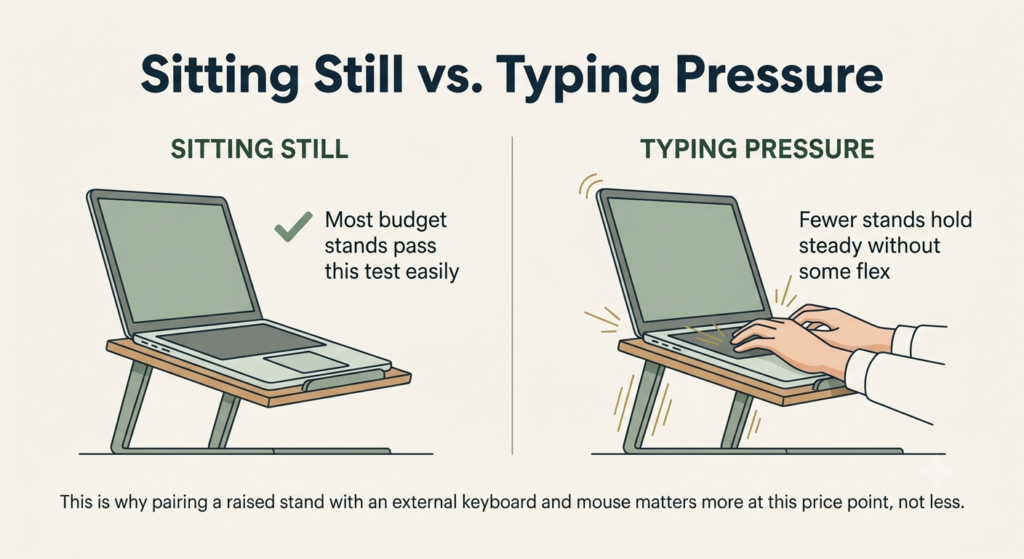
There’s also a distinction worth being clear about upfront: a stand that holds your laptop steady while it sits there is a different test than one that stays steady while you type directly on it with real pressure. Most budget stands handle the first fine. Fewer handle the second without some flex — which is exactly why pairing a raised laptop with an external keyboard and mouse matters more at this price point, not less.
One more honest note: an aluminum laptop stand usually offers better rigidity than a plastic one at this price, but it’s not an absolute rule — a well-made plastic design can still hold up fine for lighter, occasional use. The material alone doesn’t decide quality; how it’s engineered does.
Three stands, three different trade-offs — none is trying to be the cheapest overall. Match the compromise to what matters: fewest points of failure (BESIGN LS03), real adjustment without wobble (iVoler), or capacity for a heavier laptop (Nulaxy C3).
Match your situation to a stand
If you’d rather skip ahead, here’s the short version:
| What you’re prioritizing | What you’re accepting | Stand to consider |
|---|---|---|
| Fewest possible points of failure | No height adjustment | BESIGN LS03 |
| Real adjustment without excess wobble | No stated weight capacity | iVoler Adjustable Aluminum |
| A heavier laptop, more capacity | Some movement if you type directly on it | Nulaxy C3 |
Three stands, three different trade-offs
None of these three is competing to be the single cheapest option — each one earns its place by handling one specific situation well, in exchange for a limitation worth knowing about upfront.
The simplest option, nothing to break
If you want the fewest things that could possibly go wrong, the answer is often a genuinely sturdy budget laptop stand with as few moving parts as possible.
Our pick: BESIGN LS03. It assembles from three pieces in about 30 seconds, no tools required, and once it’s together, there’s nothing left to adjust, loosen, or wear out over time — the simplicity is the whole point. Independent testing showed good stability even under a 15-inch MacBook Pro with vigorous typing, a meaningful result for a stand this simple. The trade-off is exactly what you’d expect from having no moving parts: the height is fixed at 6 inches, so there’s no dialing it in for your specific desk or chair, and its 8.8-pound weight capacity covers standard laptops comfortably but rules out heavier gaming or workstation machines.
What we like
- Nothing to loosen over time: with no hinges or adjustment mechanism, there’s simply less to fail after months of daily use.
- Genuinely quick to set up: three pieces, no tools, about 30 seconds from box to desk.
- Tested stability, not just a marketing claim: independent testing confirmed it holds steady even under a heavier laptop with real typing pressure.
What to keep in mind
- No height adjustment at all: you get one fixed elevation, which either works for your setup or it doesn’t.
- Lower weight capacity than the other two: 8.8 pounds is fine for most laptops, but not for heavier gaming or workstation models.
Best for: anyone who wants the fewest possible points of failure, with a fixed height that already matches their desk.
Not the right fit if: your desk or chair height doesn’t quite line up with a fixed 6-inch lift, or your laptop is on the heavier side.
Real adjustment, without the usual wobble
If a fixed height doesn’t quite land right for your desk or chair, the next question is whether an adjustable budget stand can flex without introducing the wobble that adjustment usually brings.
Our pick: iVoler Adjustable Aluminum. It offers six real height positions, from about 2 to 5.6 inches, plus adjustable width, giving you actual room to dial in your setup rather than choosing between one fixed height and nothing. One review source that tested it directly against other adjustable budget stands called it the most stable of the group — a genuine point in its favor, since adjustable usually means more parts and more potential wobble, not less. The honest gap here is that its listing doesn’t state a weight capacity at all, so if your laptop runs heavier than average, it’s worth confirming directly rather than assuming.
What we like
- Real adjustment across six positions: enough range to actually match your desk and chair, not just a token second setting.
- Genuinely stable for an adjustable design: independent testing specifically praised it for avoiding the wobble that usually comes with more moving parts.
- Light and foldable for your own desk: at 0.6 pounds, it’s easy to reposition or put away without being a hassle — useful for a shared desk, not primarily a travel feature.
What to keep in mind
- No stated weight capacity: the listing doesn’t specify one, so confirm directly if your laptop is on the heavier side.
- Thinner build than the other two: the lighter materials that make it foldable are part of why it’s not rated for the heaviest laptops.
Best for: anyone whose desk setup needs real adjustment without the usual wobble that comes with it.
Not the right fit if: your laptop runs heavier than average — confirm the weight capacity directly, since none is stated.
Built for a heavier laptop
If your laptop runs on the heavier side — a larger workstation or gaming model — capacity matters more than shaving down to the absolute lowest price.
Our pick: Nulaxy C3. At 22 pounds of rated capacity, it holds more than either of the other two picks here, giving real headroom for laptops the BESIGN or iVoler might leave you second-guessing. It’s built from 5mm aluminum alloy with a detachable three-part design and raises your screen about 7 inches. The manufacturer itself notes that typing directly on the elevated laptop may introduce some movement, and recommends pairing it with an external Bluetooth keyboard and mouse — that’s not a hidden flaw we uncovered, it’s the company being upfront about a limitation. Pairing a raised stand with external keyboard and mouse is worth planning for as part of the same purchase, not an afterthought — exactly the logic behind our complete laptop stand, keyboard, and mouse setup guide.
What we like
- Highest weight capacity of the three: 22 pounds gives real confidence for larger or heavier laptops the other two picks might not fully support.
- Honest manufacturer disclosure: the company’s own listing tells you about the wobble risk instead of hiding it, which says something real about how the product is marketed.
- Solid ventilation from the open design: the aluminum construction and open back help with heat dissipation, a genuine bonus beyond just capacity.
What to keep in mind
- Movement when typing directly on it: this is disclosed by the manufacturer, not something we’re speculating about — plan on external keyboard and mouse from the start.
- Detachable design means more assembly than the BESIGN: three parts to put together, not a single quick snap.
Best for: anyone with a larger or heavier laptop that the other two picks might leave you second-guessing.
Not the right fit if: you’re not planning to pair it with an external keyboard and mouse — the manufacturer itself notes some movement when typing directly on it.
At 22 pounds of rated capacity, it holds more than either of the other two picks here — and the manufacturer discloses the wobble trade-off instead of hiding it.
Frequently asked questions
Are budget laptop stands worth it?
For most people, yes — a laptop stand’s core benefit, raising the screen closer to eye level, doesn’t require premium materials to work. What you’re trading at a lower price is mainly adjustment range, weight capacity, and long-term durability, not the basic function itself.
Do cheap laptop stands wobble when typing?
Some do, and it depends heavily on the specific design rather than price alone. Stands with no moving parts, like a single fixed riser, tend to hold steady since there’s nothing to flex. Adjustable or taller stands are more prone to it, especially if you’re typing directly on the elevated laptop rather than using a separate keyboard.
What features do you lose when buying a budget laptop stand?
The most common trade-offs are continuous height adjustment (often replaced by a single fixed position or a few preset steps), stated weight capacity (some budget listings simply don’t specify one), and long-term material durability under repeated folding or heavy daily use. Basic functionality — raising your screen — tends to hold up fine even at this price.
Can a budget laptop stand hold a heavy laptop?
Some can, but capacity varies significantly even within the budget range, so it’s worth checking the specific number rather than assuming. Stands built with reinforced aluminum and a wider base tend to handle more weight, while simpler or lighter-weight designs are usually rated lower.
The Bottom Line: None of Them Actually Cost Close to $35
None of these three is the single best budget laptop stand under $35 in every situation — each one accepts a different trade-off to do one thing well. If you want the fewest possible points of failure, the fixed simplicity of the BESIGN makes sense. If your desk setup needs real adjustment, the iVoler delivers that without the usual wobble penalty. If your laptop is heavier than average, the Nulaxy C3’s extra capacity is worth the honest caveat that comes with it.
What’s worth noticing across all three: none of them actually costs close to $35 — the real range here is $10 to $17. Genuine value at this price doesn’t require stretching all the way to the ceiling.
If none of these three quite match your situation, you can browse more budget laptop stands using the same rule: figure out which trade-off you can actually live with, not just which one costs the least.
RELATED GUIDES
Best Laptop Stand for Home Office
If you’re willing to spend more for real height adjustment and years of daily durability.
Read the Guide →Best Portable Laptop Stand
If your setup needs to travel with you instead of staying at one desk.
Read the Guide →Best Laptop Stand for Neck Pain and Better Posture
If neck discomfort specifically, not just budget, is driving your decision.
Read the Guide →Laptop Stand + Keyboard + Mouse
Pairing a raised stand with external input devices, planned as one purchase, not an afterthought.
Read the Guide →About This Guide
This guide helps you understand exactly which trade-off you’re accepting when you buy a laptop stand under $35 — fixed height instead of real adjustment, an unstated weight limit, or some flex once you’re typing directly on it. The goal isn’t finding the cheapest option on the page; it’s matching that specific compromise to your actual situation, not to whichever price tag looks lowest.
It’s researched and edited by César Cervantes González (Cerlez) using verified manufacturer specifications and independent reviews rather than hands-on testing.