

🕐 5 MIN ESTIMATED READ TIME
Looking down at a screen that sits too low for extended periods tends to increase how much your neck stays bent forward, and that sustained position is one common contributor to neck and shoulder discomfort. Raising the screen closer to eye level can help support a more neutral posture — which is exactly why laptop stands get recommended for this so often.
But most searches for the best laptop stand for neck pain return the same thing: a list of popular stands, none of which check whether they actually raise your screen enough for your body, or whether they hold that position without wobbling. This isn’t a medical guide, and a stand won’t treat or eliminate neck pain on its own — if your discomfort is persistent or severe, that’s worth discussing with a healthcare professional, not just solving with gear. What this guide does is show you how to choose a laptop stand for posture that fits your specific situation, so the one you pick actually does the job, not just whichever one is most popular.
Table of Contents
Affiliate Disclosure: This post contains affiliate links. We may earn a small commission at no extra cost to you. Availability is subject to change—please check the product links for current details.
Why most “best laptop stand” lists don’t actually solve this
Here’s the gap in almost every list you’ll find: they tell you a stand raises your screen, but not whether it raises it enough. A stand that lifts your laptop 4 inches might be plenty if you’re on the shorter side and your desk is already fairly low — or it might barely make a dent if you’re tall and your desk sits higher. The stands themselves aren’t wrong; the problem is that “raises your screen” isn’t a specification, it’s a claim that depends entirely on your own measurements.
The same is true for stability and adjustment. A stand that wobbles once you start typing on a nearby external keyboard cancels out whatever benefit the height gave you, and a stand with only two or three fixed positions might land you close to the right height without ever quite reaching it. None of this shows up in a typical product roundup, because most of them are built around which stands are popular, not around whether a given stand’s actual numbers match your actual body.
Getting the height right
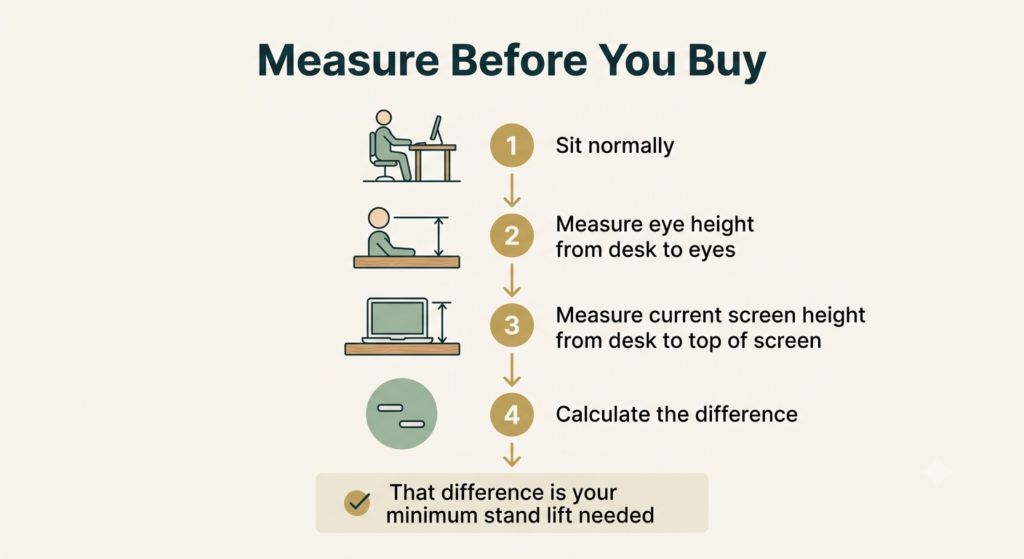
There’s no universal “correct” height for a laptop stand, because the number that matters isn’t about the stand — it’s about where your eyes sit when you’re seated normally. A simple way to work it out: measure the height of your eyes above your desk surface while sitting in your normal position, then compare that to how high your laptop’s screen currently sits. The difference between those two numbers is roughly how much lift you actually need — not the maximum a stand can offer, just enough to close that specific gap.
This is also where a lot of otherwise-good stands fall short for taller people specifically: a stand with an impressive-sounding maximum height on paper can still land short of eye level if the starting point — the desk itself, or the laptop’s own base height — is already working against it. In practice, this means treating adjustable laptop stand height requirements as personal math, not as a spec you take on faith. Checking your own numbers against a stand’s actual elevation range, top to bottom, matters more than trusting the general reputation of any one model.
Most “best stand” lists never check whether a stand raises your screen enough for your specific body. Four things actually decide that: real elevation range matched to your own eye-to-desk gap, continuous adjustment instead of fixed steps, external keyboard/mouse compatibility, and stability under real typing pressure.
The four things that actually matter
Not every one of these ergonomic laptop stand features matters equally, but skipping any one of them can undercut the rest. If you’d rather skip ahead, here’s the short version:
| Criterion | What to check | Why it matters |
|---|---|---|
| Real elevation range | The stand’s minimum and maximum height, measured against your own eye-to-desk gap | A stand that doesn’t reach your specific eye level doesn’t close the gap it’s meant to close |
| Continuous adjustment | Whether height changes smoothly across a range, or only in a few fixed steps | Fixed positions can leave you stuck just short of, or past, the height you actually need |
| External keyboard and mouse compatibility | Whether the stand is designed to be paired with a separate keyboard and mouse, not typed on directly | Raising the screen without separating the keyboard usually just moves the strain elsewhere |
| Stability under real use | Whether the base or arm holds steady while you type with real pressure, not just while sitting still | A stand that wobbles undoes the benefit of the height it worked to gain |
An example that meets these criteria
The Mount-It! Laptop Desk Mount Arm is one example — not because it’s the most popular option, but because its actual specifications hold up against each of these four criteria specifically. It adjusts smoothly across a real range up to nearly 20 inches of lift, using a gas spring rather than fixed click-stops — that’s genuine continuous adjustment, not a handful of preset heights. It’s built purely as a mount for the laptop itself, so it’s designed around pairing with an external keyboard and mouse rather than typing directly on it. And its steel construction holds that position under real typing pressure rather than settling or drifting over time. Its one honest trade-off: it clamps to your desk, so it’s a fixed-location solution, not something you move between rooms or take with you.
It adjusts smoothly across a real range up to nearly 20 inches of lift, using a gas spring rather than fixed click-stops — genuine continuous adjustment, not a handful of preset heights.
The full review, including how it compares to other fixed-desk options, lives in our laptop stand guide for a home office.
Frequently asked questions
How high does a laptop stand need to be for neck pain?
It depends entirely on your own eye height and desk height, not on a fixed number. As a starting point, measure the gap between your eyes, sitting normally, and your current screen height — that gap is roughly the elevation you need, and it varies enough from person to person that the same stand can be ideal for one person and insufficient for another.
Can a laptop stand alone fix neck pain?
Not on its own, and it’s not designed to. A stand can help reduce sustained neck flexion by supporting a more neutral screen height, but it doesn’t address every contributor to neck discomfort, and it isn’t a substitute for medical advice if pain is persistent or severe. Pairing it with an external keyboard and mouse, and with reasonable posture habits, matters just as much as the stand itself.
Is a fixed-height stand enough, or do I need an adjustable one?
If a fixed-height stand happens to land exactly at your eye level, it can work fine. In practice, few fixed positions match any given person’s measurements precisely, which is why a stand with continuous adjustment tends to be more reliable — it lets you close the exact gap you measured, rather than hoping a preset height happens to fit.
Do I need an external keyboard and mouse with a laptop stand for neck pain?
Raising the screen without separating the keyboard usually just moves the problem instead of solving it, since your laptop’s built-in keyboard rises right along with the screen. A laptop elevator for external keyboard use is really the same idea stated directly — you’re not just lifting the screen, you’re building a small system around it, and an external keyboard and mouse normally work best alongside any stand that meaningfully elevates the laptop.
The Bottom Line: Match the Numbers to Your Body, Not the Reputation
The right laptop stand for neck-related discomfort isn’t the most popular one or the tallest one on paper — it’s the one whose actual elevation range, adjustment, and stability match your specific body and desk. Measure your own gap first, then check any stand’s real numbers against it, rather than trusting a general reputation.
This is equipment that can help address a common postural cause, not a treatment — if discomfort continues despite a well-fitted setup, that’s worth bringing to a healthcare professional rather than solving with another product.
RELATED GUIDES
Best Laptop Stand for Home Office
The full review of the Mount-It! arm, including how it compares to other fixed-desk options.
Read the Guide →Best Portable Laptop Stand
If your setup needs to travel with you instead of staying at one desk.
Read the Guide →Best Budget Laptop Stands Under $35
If the four criteria here matter, but the price range doesn’t fit your budget.
Read the Guide →How to Improve Your Posture on a Laptop
A stand helps with one contributor to discomfort — posture habits matter just as much.
Read the Guide →About This Guide
This guide explains how to evaluate a laptop stand for neck comfort and posture using objective criteria rather than popularity. It focuses on measurable factors such as screen elevation, adjustment range, stability, and compatibility with an external keyboard and mouse. It’s intended to help you choose a stand that fits your body and workspace, not to provide medical advice.
Researched and edited by César Cervantes González (Cerlez), using verified manufacturer specifications where product features are discussed.