

🕐 8 MIN ESTIMATED READ TIME
A lower price doesn’t have to mean a headset that hurts to wear by hour three. The best budget headset for remote work isn’t the one with the lowest number on the price tag — it’s the one that can help you stay comfortable while giving up the things you were never going to use anyway.
If comfort matters more to you than staying within a strict budget, the most comfortable headsets for remote work aren’t limited by price at all. This guide is for a different situation: you have a real budget limit, and you want to know exactly what that limit costs you physically, and what it doesn’t have to.
Table of Contents
Affiliate Disclosure: This post contains affiliate links. We may earn a small commission at no extra cost to you. Availability is subject to change—please check the product links for current details.
Why a lower price doesn’t have to mean physical discomfort
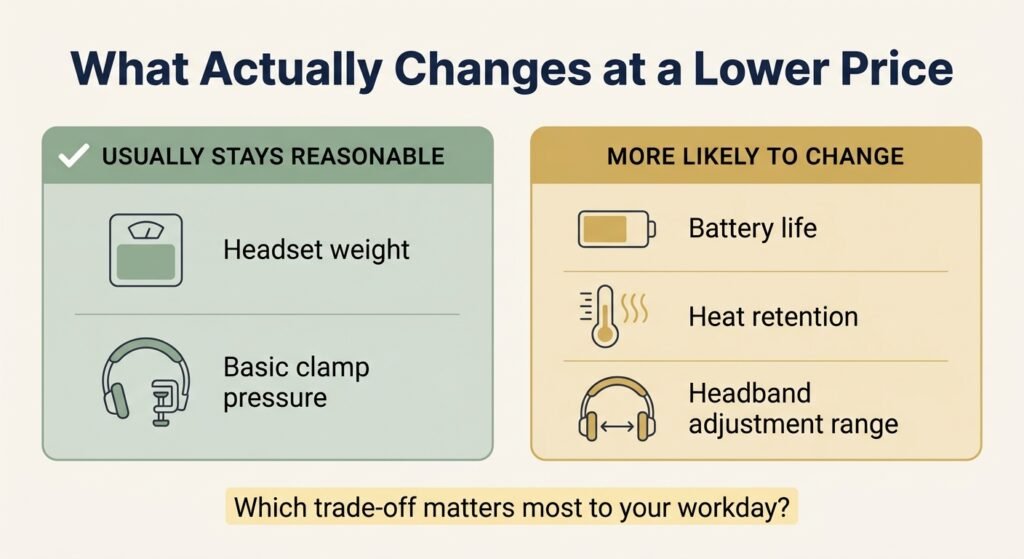
The assumption that “cheap” automatically means “uncomfortable” isn’t quite right. Weight and basic clamp pressure — two of the things people worry about most — can stay perfectly reasonable even at a lower price point. What actually tends to slip when the price drops is somewhere else entirely: heat buildup during long sessions, the range of adjustment available for different head sizes, battery life across a full day, or whether the headset is wired instead of wireless.
These aren’t just comfort preferences — they’re ergonomic factors with a direct physical cause. Weight becomes sustained load on your neck and shoulder muscles over hours, not just a number on a spec sheet. Clamp pressure concentrates force on the cartilage of your ear and your temples, which is where tension headaches from headsets tend to start. And a headband that doesn’t adjust to your head shape spreads that pressure unevenly instead of distributing it — the same amount of force, landing on a smaller area.
Spending more doesn’t automatically fix this either. A pricier headset can still run hot against your ears or create a pressure point on your forehead, while a genuinely inexpensive option can be dramatically lighter and just as wearable for hours. The real question isn’t how much you spend — it’s which specific trade-off you’re willing to live with.
A comfortable headset doesn’t have to look expensive — it has to fit the way you actually work, whether that means lighter weight, a better fit, or simply not overpaying for features you won’t use.
Three headsets, three different trade-offs — none is best overall. Pick by what you’re actually solving: lowest price, fewer compromises for a bit more, or weight above all else.
Match the headset to your priority
If you’d rather skip ahead, here’s the short version:
| If this is your priority | Look for | Headset to consider |
|---|---|---|
| The lowest possible cost of entry | Basic comfort without paying for extras you won’t use | Logitech H390 |
| Fewer physical compromises, even if it costs a bit more | A confirmed active noise cancellation feature at a moderate step up | Anker Soundcore Q20i |
| The lightest headset you can find | Weight dramatically below the typical over-ear range | EPOS Impact 100 |
What you can safely compromise on — and what you shouldn’t
A few things genuinely don’t need a bigger budget to work well. Basic clamp pressure can be perfectly reasonable on an inexpensive headset — there’s no rule that says a lower-cost option has to squeeze harder than a pricier one. Overall weight can also stay low on a budget option, sometimes lower than premium models that add bulk for extra features you may not need.
What tends to actually change as the price drops: battery life on wireless models, since budget batteries often can’t sustain a full workday without a midday charge. Ear pad material and heat retention — cheaper foam and synthetic leather can trap more heat during long sessions than better-ventilated premium materials. And range of headband adjustment — a narrower range that fits an average head fine can feel tight or loose at either extreme.
None of this means a budget headset can’t be comfortable for a full workday. It means knowing which specific trade-off you’re accepting, instead of assuming the price tag tells you the whole story.
Three headsets, three different trade-offs
None of these three is trying to be the single best headset overall — each one represents a different compromise within a limited budget.
For the lowest cost of entry: Logitech H390
If your budget is the primary constraint and you mainly need something that works reliably for calls without adding physical discomfort, you don’t need to pay for features that don’t affect how the headset feels on your head. The type of solution here is a straightforward, no-frills option that keeps the essentials — cushioning and a secure over-ear fit — without a premium price tag.
Our pick: Logitech H390. It’s a wired USB-A headset that skips every feature that doesn’t affect comfort or call quality — no app, no Bluetooth pairing, no battery to manage. At 7.04 ounces, it’s noticeably lighter than either wireless option in this guide, since there’s no battery adding weight. The rotating noise-canceling mic tucks out of the way when you’re not using it, and in-line controls on the cable let you adjust volume or mute without touching your computer. Its swivel-mounted ear cushions are leatherette, not memory foam — a real material difference from most picks in this category, though the padding itself is still genuinely comfortable for a full workday.
What we like
- Genuinely plug-and-play: no software, no pairing, no charging — it works the moment you plug it in.
- Lighter than either wireless pick, simply by having no battery: 7.04 ounces total, with nothing extra to carry the weight of.
- Backed by a long track record: Logitech is one of the most established names in this category, with years of documented reliability behind the H390 specifically.
What to keep in mind
- Wired only: the 6.23-foot cable gives you room to stand and stretch, but you’re still tethered to your computer.
- Leatherette, not memory foam: comfortable, but a real material difference from most other picks in this guide.
Best for: anyone who wants the simplest, most reliable option with nothing to configure or charge.
Not the right fit if: you need to move freely around a room during calls — the cable keeps you within reach of your desk.
For fewer compromises at a slightly higher price: Anker Soundcore Q20i
If a rock-bottom price point leaves you without any noise-cancelling feature, paying somewhat more can buy that back — along with a genuine step up in versatility.
Our pick: Anker Soundcore Q20i. It adds hybrid active noise cancellation confirmed directly by the listing — 2 internal and 2 external mics working together to cut up to 90 percent of external noise. It’s over-ear, foldable, has a detachable cable, and weighs 9.12 ounces, about 259 grams. Independent reviews describe memory foam padding, though the listing itself only specifies the outer shell material (ABS and polycarbonate), so treat the cushion material as reported rather than manufacturer-confirmed.
What we like
- A genuine feature upgrade, not just a name change: active noise cancellation cutting up to 90 percent of external noise, confirmed directly by the listing.
- Real versatility beyond ANC: Bluetooth multipoint to two devices, an EQ app with 22 presets, and a Transparency mode for staying aware of your surroundings.
- Foldable with a detachable cable: practical for anyone who’ll be packing it between rooms or trips occasionally.
What to keep in mind
- Cushion material is reported, not manufacturer-confirmed: independent reviews describe memory foam, but the official listing only specifies the outer shell.
- Heavier than the H390: at 259 grams versus 200 grams, it’s a real step up in weight, not just price.
Best for: anyone who wants a confirmed active noise-cancellation feature and genuine wireless versatility, without doubling their budget.
Not the right fit if: you need cushion material independently confirmed before buying, or you’re not willing to spend more than the absolute minimum.
For the lightest option by far: EPOS Impact 100
If weight itself is the thing making long calls uncomfortable — a heavy headset pressing down for hours — no amount of padding fully compensates for that. The type of solution here is a headset built to weigh dramatically less than the typical over-ear design, not just slightly less.
Our pick: EPOS Impact 100. At 76 to 78 grams, it weighs about 30 percent of what the Q20i above weighs — dramatically lighter than both other options here.. It uses faux leather ear pads on a slim silicone headband, and connects via a wired USB-C or USB-A cable rather than wirelessly. That’s worth presenting honestly as a genuine trade-off, not a drawback: a cable means no battery to manage or charge, but also less freedom to walk away from your desk mid-call.
What we like
- Dramatically lighter than typical over-ear headsets: at this weight, it’s barely noticeable on your head, even hours into a workday.
- No battery to manage: wired connection means you’re never caught with a dead headset mid-call.
- Genuinely low price for the amount of weight it saves compared to alternatives.
What to keep in mind
- Wired, not wireless: this limits how far you can move from your device — a real trade-off, not a flaw, depending on how you work.
- Built for calls, not general listening: the design prioritizes voice clarity and comfort over broader audio use.
Best for: anyone who finds that headset weight itself is the source of discomfort during long calls, and doesn’t mind a cable.
Not the right fit if: you need to move freely away from your desk during calls — the wired connection will get in the way.
At 76 to 78 grams, the EPOS Impact 100 weighs about 30 percent of what the Q20i weighs.
What to check before buying on a budget
A few things are worth checking directly, before the price convinces you they don’t matter.
Trusting marketing language over actual documented materials. Vague phrases like “ergonomic design” or “all-day comfort” in a product listing don’t tell you anything specific — look for confirmed details like cushion material, weight, or adjustment range instead of taking comfort claims at face value.
Assuming wireless is always the better choice. A wired connection isn’t a downgrade by default — it removes battery anxiety entirely, and if you rarely leave your desk during calls, the trade-off may not cost you anything real.
Not considering how many hours you’ll actually wear it before choosing. A headset that feels fine for a 20-minute call can feel very different after four hours of back-to-back meetings — weight and heat buildup matter more the longer a session runs.
Ignoring how your own head and ears respond, not just the spec sheet. Two people can try the same headset and feel completely different things — one person’s comfortable clamp is another’s tension headache after an hour. The ergonomic specs in this guide narrow the field, but your own body is the final test, especially in the first few sessions.
Frequently asked questions
Are budget headsets comfortable for all day use?
It depends on the specific model, not on price alone. Some budget headsets stay comfortable across a full workday, especially lighter wired models; others may run warm or develop pressure points during extended sessions, which is why checking the specific trade-offs of each model matters more than the price tag itself.
What do you sacrifice when buying a cheaper headset for work?
Usually not comfort itself, but specific things like battery life, heat management, or adjustment range. The exact trade-off varies by model — some budget options sacrifice very little physically, while others cut corners in ways that only become noticeable after a few hours of wear.
Do cheap headsets cause ear pain?
Not inherently — ear pain is more closely tied to clamp pressure and cushion material than to price. A well-designed budget headset with adequate padding can be just as comfortable as a pricier one; the risk comes from unverified products with no documented cushioning or fit information.
How heavy should a headset be for remote work?
Lighter is generally more comfortable for long sessions, though the right weight depends on how many hours you wear it daily. Headsets in the budget range vary widely — some come in dramatically under 100 grams, while others exceed 250 grams, so weight is worth checking specifically rather than assuming.
What makes a cheap headset uncomfortable during long meetings?
Heat buildup in the ear pads and excessive clamp pressure are the two most common culprits, more so than the headset’s price itself. A budget headset that manages both of those reasonably well can hold up fine through a full day of meetings.
The Bottom Line: Choosing Which Trade-Offs Fit Your Budget and Your Workday
None of these three headsets sacrifices the least overall — each one sacrifices something different, and which one fits you depends on which trade-off actually matters to your workday. If price is your main constraint with no specific physical complaint, the H390 covers the basics without overpaying. If active noise cancellation and wireless versatility matter more to you than saving the extra cost, the Q20i adds a confirmed feature the other two don’t have, with the honest caveat that its ear cushion material isn’t independently documented.. And if weight itself is what wears you down by hour three, the EPOS Impact 100 solves that specific problem better than either of the others.
The best budget headset isn’t the one that gives up the least. It’s the one that gives up the things that matter least to you.
If none of these three fit your exact situation, you can browse more best budget headset for remote work options using the same rule: know exactly what you’re trading away before the price convinces you it doesn’t matter.
RELATED GUIDES
Most Comfortable Headsets for Remote Work
If comfort matters more than staying within a strict budget, start here instead.
Read the Guide →Best Budget Ergonomic Setup for Remote Work
Smart first upgrades for a limited budget, beyond just your headset.
Read the Guide →About This Guide
This guide was created to help you make a more informed decision. Rather than assuming a higher price always means a better headset, it looks at the trade-offs that actually affect day-to-day comfort and where a lower-cost option can still make sense.
It’s researched and edited by César Cervantes González (Cerlez) using verified manufacturer specifications and independent reviews rather than hands-on testing.