

🕐 8 MIN ESTIMATED READ TIME
Your desk isn’t too tall by accident — it was built for an average that doesn’t quite match your body, and typing directly on its surface usually means your wrists bend upward for hours at a time. An adjustable under desk keyboard tray solves that specific problem: it lowers your keyboard and mouse to a height and angle your hands actually need, without touching anything else about your workspace.
This guide is for a keyboard tray as its own fix — for a desk you’re not planning to convert to sit-stand. If alternating between sitting and standing is what you’re after, a standing desk converter solves that more completely, and often includes a tray as part of the system.
Table of Contents
Affiliate Disclosure: This post contains affiliate links. We may earn a small commission at no extra cost to you. Availability is subject to change—please check the product links for current details.
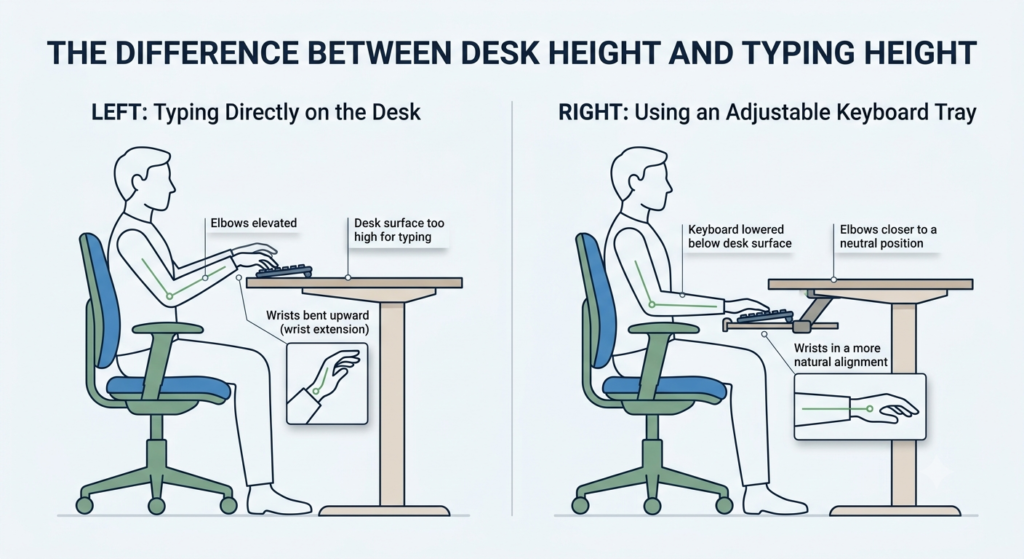
Why your desk height and your typing height are two different problems
Desks are built to one general height, and that height rarely happens to match where your elbows and wrists actually want to sit while typing. When the keyboard rests directly on the desktop, your forearms angle upward to reach it, and your wrists bend back to compensate — a position called wrist extension that most people don’t notice at first, but that becomes harder to ignore several hours into a workday.
A keyboard tray fixes this by moving the keyboard and mouse to their own adjustable surface, independent of the desk’s fixed height. This is strictly about your hands, wrists, and elbows — not your monitor height, your chair, or your lower back. If those also need attention, fine-tuning the rest of your desk setup is worth doing on its own, separate from this.
Three keyboard trays, three different problems — none is a universal best pick. Match the tray to what’s actually wrong: overall desk height (Mount-It!), precise wrist angle (Kantek), or how far your hands need to drop (VIVO).
Match the tray to what you need most
If you’d rather skip ahead, here’s the short version:
| If this is your priority | Look for | Tray to consider |
|---|---|---|
| Your desk is noticeably too high overall | The most complete range of height and tilt adjustment | Mount-It! Under Desk Keyboard Tray |
| Your desk height is close to fine, but your wrists still bend while typing | Precise, dedicated tilt control | Kantek Desk Clamp Tilting Keyboard Tray |
| You need to lower your hands significantly below the desktop | The widest available height range | VIVO Premium Adjustable 27×11″ |
What to look for in a keyboard tray
Two things decide most of whether a tray actually solves your problem — the other two matter, but less.
Height adjustment range. This is the one that matters most if your desk itself is simply too tall. A tray needs to lower far enough that your elbows can rest near a right angle, not just a couple of inches of token adjustment.
Negative tilt. Cornell University’s ergonomics program recommends pairing a height-adjustable tray with a downward, negative angle as the setup most likely to keep hands in a neutral position — the opposite of flat or tilted-up placement. A tray with only positive or flat positioning doesn’t correct the wrist bend a raised keyboard causes; it just relocates it.
Mounting mechanism and how easily the tray retracts matter too, though less than the two above — a tray that’s a fight to slide in and out under your desk is one you’ll eventually stop using. Before settling on a mounting style, it’s worth checking what’s actually underneath your desk: crossbars, drawers, or desk frames can block a tray’s installation regardless of how good its other features are. And real space for your keyboard and mouse together is worth checking, though in practice the trays worth considering here land in a similar range on this specific point, so it’s not the deciding factor between them.
Three trays, three different problems
None of these three is trying to be the single best keyboard tray — each earns its place by solving a different version of the same underlying problem.
For the most complete adjustment in one system: Mount-It! Under Desk Keyboard Tray
If your desk runs generally too high — not just slightly, but enough that no single adjustment fixes it — you need a tray that handles height, tilt, and positioning together, rather than excelling at only one.
Our pick: Mount-It! Under Desk Keyboard Tray. It adjusts 5.5 inches in height and turns via a control knob between negative, neutral, and positive tilt, plus left-right swivel — three axes handled by one mechanism. It mounts by bolting directly to the desk rather than clamping, which tends to hold steadier under daily typing than a tray that only clamps to the desk edge. A built-in gel wrist rest for both the keyboard and mouse platforms rounds out the package.
What we like
- Height, tilt, and swivel in one system: you’re not choosing between adjustment types — this one handles all three.
- Bolted mounting holds steady: a firmer typing surface than a tray that only clamps to the desk edge.
- Wrist rest included on both platforms: one purchase covers keyboard and mouse support together.
What to keep in mind
- No specific tilt degrees published: the knob adjusts between negative, neutral, and positive, but Mount-It doesn’t state exact angles the way a dedicated tilt specialist does.
- Bolt-on installation is more involved than a clamp — it’s sturdier, but not something you’ll reposition on a whim.
Best for: a desk that’s noticeably too tall overall, where you need height, tilt, and swivel handled together.
Not the right fit if: your desk height is already close to right and your main complaint is specifically wrist angle — the Kantek is built for that more precisely.
For precise negative tilt: Kantek Desk Clamp Tilting Keyboard Tray
If your desk height is already reasonably close to comfortable but your wrists still bend upward while typing, the problem isn’t how high your hands sit — it’s the angle. A general-purpose tray with vague tilt doesn’t solve this as well as one built specifically around the angle itself.
Our pick: Kantek Desk Clamp Tilting Keyboard Tray. It offers five distinct tilt positions — -15°, -7.5°, 0°, 7.5°, and 15° — letting you choose a more specific angle instead of settling for a vague “tilted down” setting. Ball-bearing tracks keep the slide smooth, and a rear safety edge keeps the keyboard from sliding off the back. It’s worth being precise about the mounting system here: the listing’s title references a clamp, while its specification table lists it as surface-mounted — we can’t confirm which applies with certainty, so treat the installation method as something to verify directly before buying.
What we like
- Five precise tilt settings: a genuine range to fine-tune wrist angle, not just “tilted” versus “flat.”
- Ball-bearing slide: smoother in and out than a basic track.
- Rear safety edge: keeps the keyboard from sliding off during use.
What to keep in mind
- No height adjustment at all: this tray only tilts — if your desk itself is too tall, this alone won’t fix that.
- Mounting mechanism unclear from the listing: confirm the installation method directly before you buy, since the title and specifications don’t fully agree.
Best for: a desk that’s already close to the right height, where wrist angle is the actual complaint.
Not the right fit if: your desk is genuinely too tall — you’ll need a tray with real height adjustment, not tilt alone.
For the widest height range: VIVO Premium Adjustable 27×11″
If your hands need to drop well below the desktop to reach a comfortable typing height, the deciding factor isn’t tilt precision — it’s simply how far the tray can travel.
Our pick: VIVO Premium Adjustable 27×11″. It offers 6.3 inches of height adjustment, the widest range of the three trays here, plus full lateral rotation and compatibility with both straight and corner desk layouts. At 12 pounds, the tray itself has real weight, and VIVO specifically recommends confirming your desk can support the mounted load before installing — a detail worth taking seriously rather than skipping.
What we like
- Widest height range of the three: built for situations where a couple of inches of adjustment wouldn’t be enough.
- Works with corner desks, not just straight ones: a genuinely flexible mounting option.
- Full lateral rotation: repositions to match your desk’s layout rather than forcing one fixed angle.
What to keep in mind
- No published tilt degrees: height is the strength here, not precise angle control.
- Real weight to account for: at 12 pounds, checking your desk’s mounting capacity first isn’t optional — it’s the manufacturer’s own stated precaution.
Best for: a desk where your hands need to drop significantly to reach a comfortable height.
Not the right fit if: your desk height is already close to fine and wrist angle is your real complaint — the Kantek addresses that more directly.
The VIVO’s 6.3 inches of height adjustment is nearly a full inch more than the Mount-It’s already substantial 5.5-inch range — the widest of the three.
Common mistakes to avoid before buying
A few mistakes come up often enough with keyboard trays that they’re worth naming directly.
Not checking under-desk clearance before buying. Crossbars, drawers, or a beveled desk edge can block a tray’s mounting hardware entirely — measure what’s actually underneath your desk, not just the desktop surface itself.
Assuming any tray solves any problem. Height and tilt are genuinely different issues — a tray with excellent tilt but no height range won’t help a desk that’s simply too tall, and vice versa.
Buying based on price alone without checking the mounting mechanism. A tray that seems stable in photos can still wobble in daily use if the mounting hardware is lighter-duty than it looks.
Frequently asked questions
What is a negative tilt keyboard tray and do I need it?
A negative tilt angles the keyboard down and away from you, rather than flat or tilted up, which keeps your wrists closer to a neutral position instead of bending upward. You likely need one if your wrists ache or feel bent after typing sessions, even when your desk height itself feels reasonable.
How far down should a keyboard tray adjust?
It depends on how far your current desk height is from your ideal typing height — enough that your elbows can rest near a right angle with your forearms roughly parallel to the floor. A tray with only an inch or two of range may not be enough if your desk runs significantly tall.
How wide does a keyboard tray need to be for a mouse?
Most trays built for both a keyboard and mouse together provide enough width for standard-size keyboards plus a dedicated mouse platform, though it’s worth checking the specific dimensions against your own keyboard before buying, especially with a full-size board.
Do clamp-on keyboard trays wobble when typing?
It depends heavily on the specific mounting hardware, not clamp-mounted trays as a category. A tray that bolts directly to the desk tends to hold steadier under daily typing than a lighter clamp mechanism — if stability is your main concern, a bolted mount is worth prioritizing over a quick-clamp system.
The bottom line: Height and Angle Are Two Different Fixes
None of these three trays is the universal best pick — each solves a different version of the same problem. If your desk runs generally too tall, the Mount-It!’s combined height, tilt, and swivel covers the most ground at once. If your desk height is close to right and your wrists are still bending, the Kantek’s precise tilt settings address that directly. And if you need to drop your hands significantly below the desktop, the VIVO’s wider range gets you there.
And if what you actually need is a full system — stand, keyboard, and mouse chosen together rather than one piece added on — building that deliberately is worth doing on its own.
If none of these three fit your exact desk, you can browse more adjustable under desk keyboard tray options using the same rule: match the tray to which specific problem — height or angle — is actually yours.
RELATED GUIDES
Standing Desk Converter for Laptop
If alternating between sitting and standing is what you’re after, this solves it more completely than a tray alone.
Read the Guide →Ergonomic Desk Setup Adjustments
For everything beyond your hands — monitor height, footrest, and lower back support.
Read the Guide →About This Guide
The purpose of this guide is to help you choose an adjustable under desk keyboard tray that solves the problem you actually have. Desk height and wrist angle are often treated as the same issue, but they require different fixes — this guide helps you identify which one is affecting your typing before you buy.
It’s researched and edited by César Cervantes González (Cerlez) using verified manufacturer specifications and independent reviews rather than hands-on testing.