
🕐 12 MIN ESTIMATED READ TIME
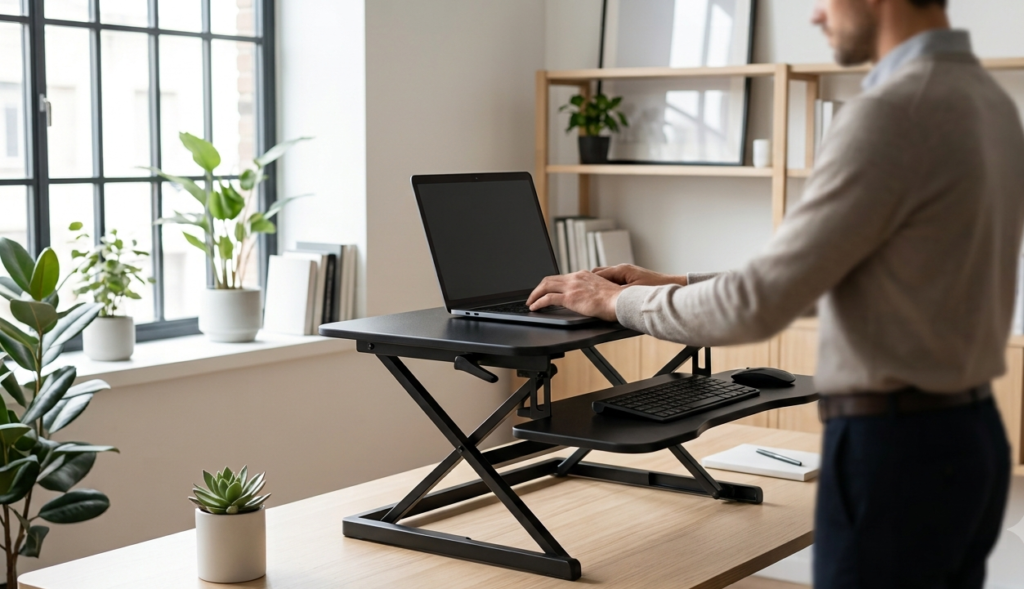
Your desk isn’t going anywhere, but your body still needs to move. Sitting through an entire workday puts continuous strain on your body, and if you’re not ready to replace your desk with something electric and expensive, a standing desk converter for laptop use solves a narrower, more specific problem: it lets you alternate between sitting and standing on the desk you already have, without buying anything new to sit on top of.
This guide walks through what actually matters before you buy one — not surface area or style, but the mechanics that decide whether it holds up under real daily use.
Table of Contents
Affiliate Disclosure: This post contains affiliate links. We may earn a small commission at no extra cost to you. Availability is subject to change—please check the product links for current details.
Why a standing desk converter makes sense for laptop work
Sitting for hours at a stretch adds up on your body, and a fixed desk doesn’t give you any way to change that without buying new furniture. A standing desk converter sits on top of what you already have and lets you shift positions throughout the day instead of staying locked into one.
Changing your working position regularly — including standing for part of the day — is a principle OSHA’s own guidance on computer workstations describes as good practice, not just a marketing claim from a converter brand. For laptop users specifically, this matters more than it might for a desktop setup, because a laptop doesn’t give you the same flexibility a monitor and separate keyboard do — the screen and keyboard move together, whatever height you’re at. A converter doesn’t fix that trade-off on its own, but it does let you change your overall position throughout the day, which is where most of the benefit of alternating actually comes from.
A converter is one specific piece of a workspace — if your monitor height, footrest, or lumbar support also need attention, fine-tuning the rest of your desk setup is worth doing on its own.
Standing desk converter vs. a full standing desk: which one fits your situation
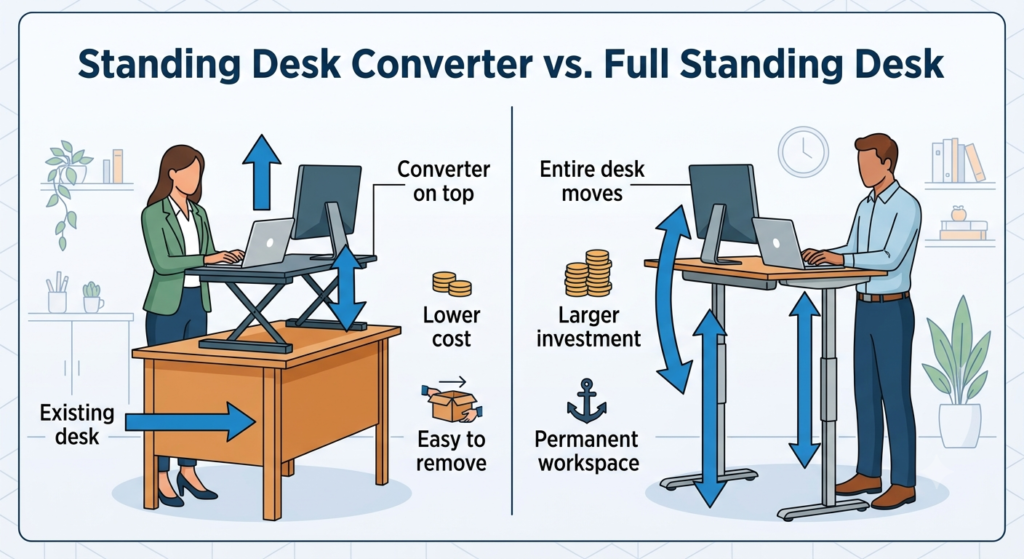
Before comparing specific converters, it’s worth asking whether a converter is even the right category for you. A full standing desk replaces your furniture entirely and usually costs several times more, but it also gives you a cleaner, more integrated setup with nothing sitting on top of your existing desk.
A standing desk converter makes more sense if you rent your space, share a desk, don’t want to commit to new furniture, or simply like the desk you already have. It’s also the lower-cost way to test whether alternating between sitting and standing is something you’ll actually keep up with, before spending significantly more on a permanent setup. If you already know you want to stand most of the day rather than alternate, or you’re furnishing a workspace from scratch anyway, a full standing desk may serve you better long-term.
Four standing desk converters, four different problems — none is a universal best pick. Match the converter to what matters most: widest height range (WorkFit-T), rock-solid stability (VariDesk), effortless switching (WorkFit-S), or budget without sacrificing the mechanism (Victor DCX760).
Match the converter to what matters most to you
If you’d rather skip ahead, here’s the short version:
| If this is your priority | Look for | Converter to consider |
|---|---|---|
| The widest possible range between sitting and standing height | A tall lift range that works whether you’re short or tall | Ergotron WorkFit-T |
| A setup that won’t wobble at full height | A heavy base and reinforced stability bars, not just a single column | VariDesk Pro Plus 36 |
| Switching positions without it feeling like a chore | A counterweight system that adjusts to your own load | Ergotron WorkFit-S |
| Genuine stability without paying a premium price | A solid gas-spring mechanism at an accessible price | Victor DCX760 |
What to look for in a standing desk converter
Four things decide whether a converter actually solves your problem or just becomes something else in your way.
Height range for both sitting and standing. The converter needs to go low enough that your elbows stay level with the keyboard while seated, and high enough that you’re not hunching or reaching upward once you stand. A short lift range might work fine for one height but leave a taller or shorter person compensating with their posture instead of the converter doing the work.
Stability at maximum height. This is the detail that’s hardest to judge from a product photo. A converter can look sturdy sitting at its lowest position and still wobble noticeably once raised, since the added height makes any looseness in the base far more apparent.
Keyboard height relative to your elbow. Some converters keep the keyboard tray at a fixed offset below the main work surface; others let it move independently. The goal is the same either way — your wrists should stay roughly level with your elbows, not angled up or down, whether you’re sitting or standing.
How easy it actually is to switch positions. A converter that requires two hands, a hard yank, or several seconds of fighting with a lever is one you’ll stop using by your second week, no matter how good its other specs are. The mechanism matters here as much as the range it covers.
One more practical note, separate from the four criteria above: measure your desk’s depth before buying, since a converter that’s plenty stable on a full-size desk can hang off the edge of a smaller one. It’s worth checking for fit, but it shouldn’t outweigh the four criteria above — a converter that fits your desk but wobbles when you type still leaves you with the same problem you started with.
Four converters, four different problems
None of these four is trying to be the single best standing desk converter — each one earns its place by solving one priority particularly well.
For the widest range of motion: Ergotron WorkFit-T
If your height falls outside the average range — you’re noticeably tall, short, or you share a desk with someone whose height is very different from yours — a converter with a limited lift range leaves you compensating with your posture no matter how good its other features are. The type of solution here is a lift range that genuinely covers sitting and standing for a range of body types, not just the average.
Our pick: Ergotron WorkFit-T. It lifts 15 inches straight up with no assembly required — it simply sits on top of your existing desk rather than clamping to it, which also means it works on desks where a clamp wouldn’t have anywhere secure to grip. The keyboard tray moves in tandem with the main surface but sits 4.5 inches below it, which keeps your wrists at a more level angle at any height, not just the one you set it at first.
What we like
- No clamp, no assembly: it sits directly on your desk, so there’s nothing to install and no risk of a clamp not fitting your desk’s edge.
- Keyboard tray stays properly offset: the 4.5-inch drop below the main surface keeps your wrist angle consistent at any height.
- No-sway lift confirmed by the manufacturer’s own testing, not just a marketing claim.
What to keep in mind
- Lower weight capacity than the other three: it’s rated for 35 pounds, so a heavy monitor on top of a laptop setup could get close to that limit.
- No independent monitor adjustment: the whole surface moves together — there’s no separate height control for a screen alone.
Best for: anyone whose height falls outside the average range, or who wants a converter that requires zero setup.
Not the right fit if: you’re already running close to the weight limit with a heavy external monitor — check the other three instead.
For stability you can trust at any height: VariDesk Pro Plus 36
A converter that wobbles once it’s raised undermines the entire point of buying one — typing on an unstable surface is worse than not having a converter at all, since now you’re bracing against movement instead of just sitting too low. The type of solution here isn’t a taller lift range, it’s genuine structural stability: a heavy base and reinforced frame that holds its position instead of flexing under normal use.
Our pick: VariDesk Pro Plus 36. Dual stability bars and a heavy steel base are built specifically to keep the surface from flexing once you’re at full height, and the rowing-style spring lift means both hands share the effort of raising it rather than one arm doing all the work. It’s also the original design in this category — the company built its reputation on this exact model before anything else in its current lineup.
What we like
- Genuinely reinforced for stability: the dual stability bars are a structural feature, not just marketing language, and hold up at full height.
- Two-handed lift shares the effort: neither arm does all the lifting, which matters if you’re adjusting the height more than once a day.
- Ships fully assembled: no setup beyond placing it on your desk.
What to keep in mind
- Some wobble while actively adjusting the height — this happens during the motion itself, not once it’s settled at a fixed position, but it’s worth knowing before you buy.
- Lower monitor capacity than a dedicated dual-monitor arm: the upper tier is sized for two screens, not for anything heavier.
Best for: anyone who’s dealt with a wobbly converter before and wants a genuinely reinforced base.
Not the right fit if: a completely wobble-free lift, even mid-adjustment, is a dealbreaker for you.
For switching positions without a fight: Ergotron WorkFit-S
If raising and lowering your converter feels like enough of a hassle that you just stop doing it, the converter isn’t really solving the problem it was bought for — it becomes furniture you set once and leave alone. The type of solution here is a transition mechanism that adjusts to how much weight you’re actually carrying, so the effort stays low no matter what you’ve mounted on it.
Our pick: Ergotron WorkFit-S. A variable weight setting lets you calibrate the lift to your own setup, so moving between sitting and standing takes roughly the same light effort whether you have a single laptop screen or two full monitors mounted. It clamps directly to your desk’s edge rather than sitting freestanding, which keeps the whole unit more securely anchored during the transition itself.
What we like
- Adjusts to your actual load: the variable weight setting keeps the lift light regardless of what you’ve mounted, not just at one fixed configuration.
- Widest independent range of the four: 18 inches of surface lift plus 5 inches of separate monitor adjustment.
- Clamp-mounted for extra security: anchored to the desk edge itself, not just resting on top.
What to keep in mind
- Requires a clamp-compatible desk edge: it won’t work on desks thicker than 2.4 inches or without an accessible edge to grip.
- The highest price of the four: you’re paying for the adjustment mechanism and independent monitor control specifically.
Best for: anyone who expects to switch positions multiple times a day and wants that motion to stay effortless regardless of what’s mounted.
Not the right fit if: your desk is too thick for a clamp, or doesn’t have an edge free enough to attach one.
The WorkFit-S offers 18 inches of surface lift plus another 5 inches of independent monitor adjustment — 23 inches of combined range across the two.
For a stable setup on a tighter budget: Victor DCX760
Stability isn’t only available at a premium price, and assuming otherwise can mean overpaying for features you don’t actually need. The type of solution here is a converter built on a genuinely solid mechanism, without the extra cost of independent monitor adjustment or a heavy-duty clamp system.
Our pick: Victor DCX760. A pneumatic gas-spring system handles the height adjustment smoothly, and the wood-and-steel frame construction holds up to daily use without the premium price tag of the other three. It’s worth being precise about what we can confirm here: the listing doesn’t detail the base’s specific structural design, so we’re not claiming a particular stability mechanism beyond what’s actually documented — solid materials and a proven gas-spring lift.
What we like
- Genuinely lower price than the other three: without cutting the core mechanism that makes the height adjustment work smoothly.
- Solid wood-and-steel construction: not a lightweight frame that flexes under normal desk use.
- Removable keyboard tray: useful on the days you want the full surface clear.
What to keep in mind
- Less independently documented than the other three: the materials and lift mechanism are confirmed, but we can’t verify additional structural claims sometimes mentioned elsewhere.
- No independent monitor adjustment: the surface moves as one piece, the same limitation as the WorkFit-T.
Best for: anyone who wants genuine stability without paying for features they won’t use.
Not the right fit if: you specifically need independent monitor height control — the WorkFit-S is built for that.
Common mistakes to avoid before buying
A few mistakes come up often enough with standing desk converters that they’re worth naming directly, before you’re the one making them.
Choosing by surface size instead of the criteria above. A converter with a huge work surface can still wobble at full height or leave your wrists at a bad angle — desk size is worth checking for fit, but it’s not a substitute for the four things that actually decide comfort.
Picking a model where the keyboard sits too high once you’re seated. If the keyboard tray doesn’t drop below the main surface, or drops by too little, you’ll end up typing with your wrists angled upward the entire time you’re sitting — the exact problem a converter is supposed to solve, not create.
Buying the cheapest option without checking how it behaves at full height. A converter that seems stable sitting flat on your desk can behave very differently once it’s raised — look specifically for feedback about the standing position, not just how easy it was to unbox.
Frequently asked questions
How high does a standing desk converter need to rise for proper ergonomics?
Your elbows should stay at roughly a 90 to 100-degree angle whether you’re sitting or standing, with the keyboard at a height that doesn’t force your wrists up or down to reach it. The exact number depends on your height and your desk’s starting height, which is why a wider lift range works for more people than a narrow one.
Will a standing desk converter be stable enough for typing on a laptop?
It depends on the specific converter’s build, not standing desk converters as a category. A well-built model with a reinforced base holds steady even at full height and while actively typing; a lightweight or poorly constructed one can wobble noticeably, especially once raised.
Can I use a standing desk converter with just a laptop (no external monitor)?
Yes — a converter still lifts your laptop screen and keyboard together to standing height, even without a separate monitor. The trade-off is the same one a laptop always has: the screen and keyboard move as one unit, so a converter changes your overall position, not the screen-to-keyboard relationship itself.
Is a standing desk converter better than a full standing desk?
Not universally — it depends on your situation. A converter costs less and works with the desk you already have; a full standing desk gives you a more integrated, permanent setup but costs significantly more and means replacing furniture.
Does a standing desk converter fit on a small home office desk?
Most do, but it’s worth checking the converter’s footprint against your desk’s actual depth before buying. A converter that’s stable on a full-size desk can extend past the edge of a smaller one, which affects both stability and usability.
The bottom line: Match the Converter to Your Priority, Not Its Feature List
None of these four converters is the universal best pick — each one solves a different priority. If your height falls outside the average range, the WorkFit-T’s lift range covers more ground than a standard converter would. If stability is what you’re worried about, the VariDesk Pro Plus 36 is built specifically for that. If you expect to switch positions often and want it to stay effortless, the WorkFit-S adjusts to your actual load. And if budget matters most without sacrificing a genuinely solid mechanism, the Victor DCX760 gets you there.
The right choice comes down to which of these four priorities is actually yours — not which converter has the most features listed on the box. And if you’re not sure yet where this fits among everything else your workspace could use, working through the right order for the rest of it is worth doing before you add anything else.
If none of these four fit your exact situation, you can browse more standing desk converter for laptop options using the same rule: match the converter to the priority that’s actually yours, not the one with the longest feature list.
RELATED GUIDES
Ergonomic Desk Setup Adjustments
For everything beyond alternating positions — monitor height, footrest, and lower back support.
Read the Guide →Adjustable Under Desk Keyboard Tray
If you’re not planning to alternate between sitting and standing, this solves a narrower version of the same problem.
Read the Guide →About This Guide
The purpose of this guide is to help you choose a standing desk converter for a laptop based on the problem you actually need to solve—not the model with the longest feature list. It explains when a converter makes more sense than a full standing desk, what to look for before buying, and which of these four options best fits different priorities.
It’s researched and edited by César Cervantes González (Cerlez) using verified manufacturer specifications and independent reviews rather than hands-on testing.