

🕐 8 MIN ESTIMATED READ TIME
An honest, practical guide to headsets that still feel good after a full day of calls — matched to what actually bothers you, whether that’s sore ears, glasses, or a stiff neck by mid-afternoon.
Table of Contents
Affiliate Disclosure: This post contains affiliate links. We may earn a small commission at no extra cost to you. Prices and availability are subject to change—please check the product links for current details.
Why Comfort Beats Audio Specs for Remote Work
If your day runs on back-to-back calls, you know the feeling: the headset that sounded great at 9 a.m. has your ears aching and your neck stiff by mid-afternoon. Most “best headset” lists rank by microphone and noise cancellation — useful, but not what makes you lift the earcups for a moment of relief at hour three.
This guide uses a simpler test: how a headset feels after four hours, not how it sounds out of the box. Each pick below solves a different discomfort, so you can choose the one that matches your situation instead of chasing an overall “winner.”
This guide uses a simpler test: how a headset feels after four hours, not how it sounds out of the box.
What Makes a Headset Comfortable for an 8-Hour Workday?
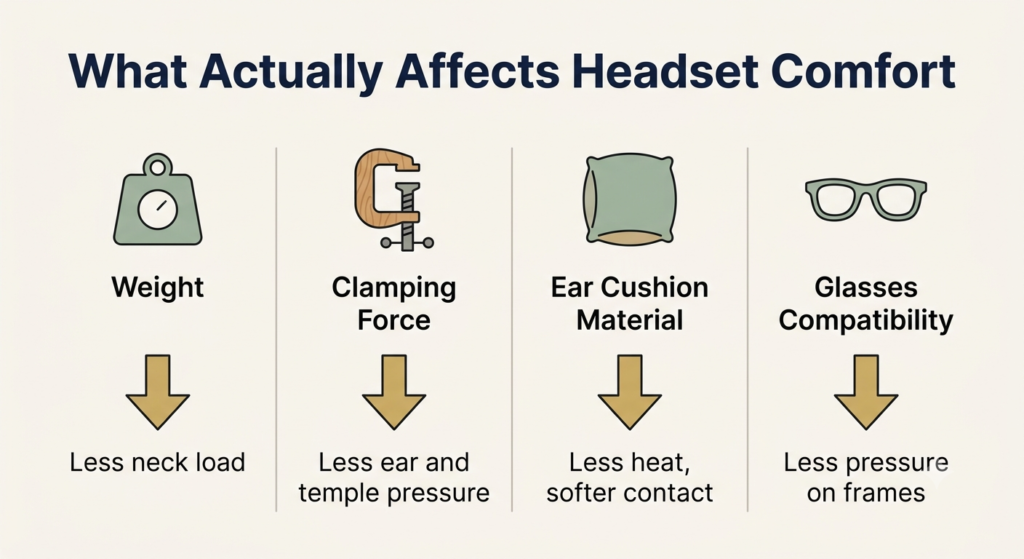
A few things decide whether a headset disappears on your head or becomes a distraction you can’t ignore:
- Weight: lighter almost always wins for all-day wear. Extra grams become a constant load your neck holds, and you feel it long before sound quality matters.
- Clamping force and cushions: a firm clamp feels secure at first but causes most sore ears and tension headaches by lunch. Soft, breathable memory-foam pads spread that pressure and let heat escape.
- Glasses fit: earcups press your frame arms into your head, so plush, deeper cushions that give the arms room to rest make all the difference if you wear glasses.
- Isolation vs. fatigue: heavy noise cancellation is great in a loud room, but sealing yourself off all day can be tiring. Sometimes the comfortable choice is the one that lets your ears breathe.
What to Avoid in Long-Call Headsets
The most common comfort mistakes:
- Heavy gaming or audiophile headphones for calls — built for sound, not for an 8-hour meeting day.
- High clamping force for the sake of isolation — feels secure at first, hurts by lunch.
- Stiff, sealed earpads — they trap heat and press hardest on glasses arms.
- Buying on specs or brand alone — the number that matters most, how it feels after six hours, never appears on the box.
The Case for a Dedicated Work Headset
Worth weighing before you buy:
Why it helps: you stay hands-free with your head straight instead of cradling a phone, your voice is clear without hunching toward the laptop, and the comfort is tuned for hours rather than minutes.
The trade-offs: it’s another device to charge, and the lightest, softest options sit in the $100–$300 range rather than the bargain bin.
Four headsets, four different discomforts — none is a universal “most comfortable.” Match the headset to what’s bothering you: back-to-back meetings (Jabra Evolve2 65), sore ears (Zone Vibe 100), glasses (Poly Voyager Focus 2 UC), or covering your ears all day (Shokz OpenComm2).
The Most Comfortable Headsets for Remote Work, by Need
There’s no single most comfortable headset — there’s the right one for what’s bothering you. Here’s the quick version:
| Headset | Best for | Why it’s comfortable | Keep in mind |
|---|---|---|---|
| Jabra Evolve2 65 | Back-to-back meetings | Light, soft cushions, all-day balance | On-ear fit can feel snug for some |
| Logitech Zone Vibe 100 | Sensitive, easily-sore ears | Very gentle, low-clamp fit | No active noise cancellation |
| Poly Voyager Focus 2 UC | Glasses wearers | Soft cushions give frame arms room | Bulkier to travel with |
| Shokz OpenComm2 | Staying aware / open-ear comfort | Ears stay fully uncovered | Thin sound, less privacy |
Now the detail on each.
Jabra Evolve2 65: Best for Back-to-Back Meetings
If your day is mostly meetings and you want one dependable headset from morning to sign-off, this is the balanced choice — light, soft memory-foam cushions, wireless freedom, and a clear noise-canceling mic. It’s our top recommendation if your schedule is filled with long meetings.
What we like
- Lightweight with soft cushions: comfortable enough to forget you’re wearing it through a full day of calls.
- Long wireless battery: lasts well beyond a single workday, so there’s no scrambling to charge mid-meeting.
- Clear noise-canceling mic: keeps your voice front and center over household noise, so you’re not repeating yourself.
What to keep in mind
- Snug for some heads: the on-ear design can feel a little tight over very long sessions or if you’re sensitive to pressure.
- Premium price: worth it for daily use, harder to justify for occasional calls.
Best for: anyone whose day is dominated by back-to-back meetings and wants one dependable headset for all of them. Not the right fit if: your ears are already sensitive to pressure — the Zone Vibe 100’s looser clamp is a better starting point.
Logitech Zone Vibe 100: Best for Sensitive Ears
If standard headsets leave your ears sore or give you a pressure headache, this one is built around exactly that complaint. It’s deliberately light with a loose, gentle clamp, so it rests on your head instead of squeezing it — one of the lighter options designed to reduce ear pressure during long sessions.
What we like
- Very low clamping force: the gentle fit relieves the temple and ear pressure that causes headaches on long days.
- Plush memory-foam pads: soft cushions that conform to your ears rather than pressing flat against them.
- Light and unobtrusive: barely any load on your head or neck, first call to last.
What to keep in mind
- No active noise cancellation: it relies on soft passive isolation, so it’s not for a genuinely loud room.
- Looser fit feels less secure: the relaxed clamp that makes it comfortable isn’t locked tightly in place if you move around a lot.
Best for: anyone whose ears get sore or who gets pressure headaches from standard headsets. Not the right fit if: you’re in a genuinely loud room — the lack of active noise cancellation means it won’t block much out.
Poly Voyager Focus 2 UC: Best for Glasses Wearers
Glasses change everything, because the earcups push your frame arms into your head. This one is lightweight and genuinely soft against the head and ears, with cushions that give your glasses room to sit —which makes it a practical option for people who wear glasses. The boom mic is also one of the clearest here.
What we like
- Soft, accommodating cushions: your glasses arms rest comfortably instead of digging in over a long day.
- Excellent boom mic with noise reduction: your voice comes through cleanly even in a busy home.
- Balanced over-ear fit: built for hours of wear without the hot, heavy feeling of bulkier headsets.
What to keep in mind
- Bulkier to travel with: the over-ear design and boom mic take up more bag space than a compact option.
- Higher price point: sensible for daily callers, a lot for light use.
Best for: anyone who wears glasses and has struggled with earcups pressing the frame arms into their head. Not the right fit if: you need something compact for travel — the over-ear design and boom mic take up real bag space.
Shokz OpenComm2: Best for Open-Ear Comfort
If covering your ears all day wears you out — or you need to hear your kids, your doorbell, or someone in the room — this takes a completely different approach. It uses bone conduction to sit in front of your ears, leaving them open, so nothing presses on them at all. It’s ideal if you prefer an open-ear design for your remote work setup and you’re fighting end-of-day listening fatigue.
What we like
- Open-ear design leaves your ears free: nothing covers or presses them, reducing the soreness and heat that build up under traditional headsets.
- Stays aware of your surroundings: you hear your room and family while still on the call, which feels far less isolating.
- Very light with a clear boom mic: easy to wear for hours, and your voice stays clear to callers.
What to keep in mind
- Thin sound and weak bass: built for voice, not music, so it’s underwhelming between calls.
- Less privacy and isolation: your ears stay open, so people nearby can hear a little, and it won’t block a noisy room.
Best for: anyone who finds covering their ears all day tiring, or who needs to stay aware of people or sounds around them while on calls. Not the right fit if: sound quality for music matters to you, or you need real privacy — the open design is built for voice, not for blocking out or containing sound.
Ergonomic Tips to Reduce Neck and Ear Strain
The right headset helps, but how you use it matters just as much:
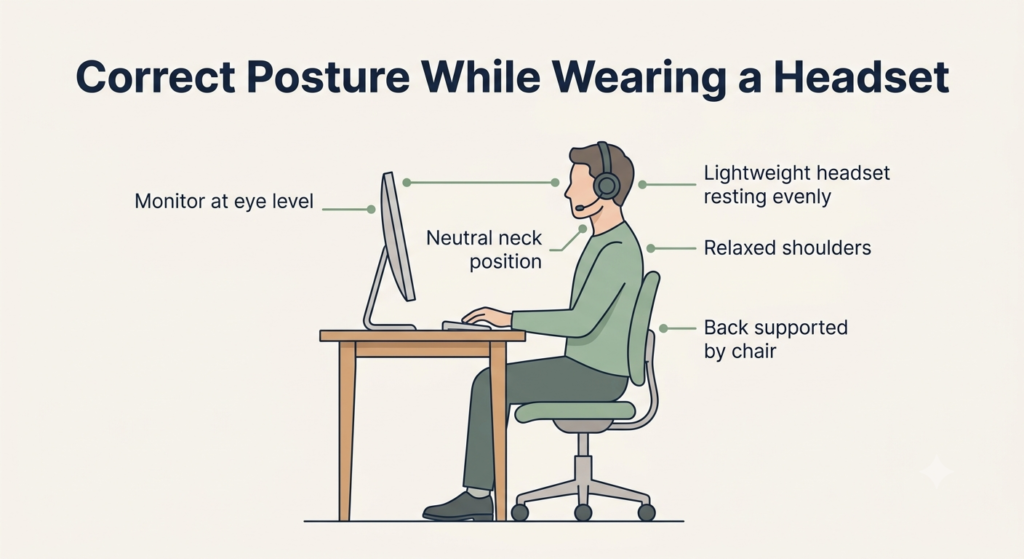
- Raise your screen to eye level. A low laptop screen makes you tilt your head down all day; a stand or external monitor keeps your neck neutral.
- Keep your head balanced over your shoulders. Let the headset do its job so you’re not cradling a phone — that alone reduces a lot of the neck strain a long day creates.
- Adjust the fit and take short breaks. Set the headband so it rests without pinching, and slip the headset off for a minute between meetings to let your ears recover.
- Keep the volume moderate. Lower listening levels ease both ear fatigue and the wear of a long call day.
Comfort comes from the whole setup, not a single product.
Frequently Asked Questions
Why do my ears hurt after wearing a headset all day?
Usually it’s clamping force squeezing your head and pressing the cushions (and your glasses arms) into your ears, made worse by heat from sealed pads. A lighter headset with a gentler clamp and soft, breathable cushions — plus short breaks — solves most of it.
How can I avoid ear fatigue from wearing headphones?
Keep the volume moderate, take a short break every hour or two, and choose a lighter design with a looser fit. If it’s a daily problem, an open-ear headset leaves your ears uncovered and removes the pressure and heat that cause most of it.
Are over-ear or on-ear headsets better for long calls?
For most people, over-ear is more comfortable because the cushions surround your ears instead of pressing on them. On-ear models are lighter and cooler but rest directly on your ears, which tends to cause soreness after a few hours. Open-ear designs avoid both issues entirely.
Can wearing a heavy headset cause neck pain?
It can contribute. The weight adds a small, constant load your neck holds all day, and the real culprit is often a low screen that makes you tilt your head down. A lightweight headset plus a screen at eye level keeps your neck neutral.
What’s the most comfortable headset if I wear glasses?
Look for soft, deep cushions and a gentle clamp that give your frame arms room to rest, rather than thin pads that press them in. The Poly Voyager Focus 2 UC is a strong choice, and sliding your glasses slightly forward before putting the headset on helps too.
The Bottom Line: Match the Headset to What’s Actually Bothering You
There’s no single most comfortable headset for remote work — just the right one for what’s bothering you. The Jabra Evolve2 65 suits most people for all-day calls; the Logitech Zone Vibe 100 is built for sore ears; the Poly Voyager Focus 2 UC works well with glasses; and the Shokz OpenComm2 keeps your ears open and your day feeling lighter.
Whichever you pick, comfort comes from the whole setup — the order to handle everything else in, starting with your screen height and posture, matters just as much as the headset itself. The best headset is the one you forget you’re wearing by the end of the day.
There are plenty of other comfortable headsets worth exploring — you can browse more comfortable headset for remote work options using the same rule: match the headset to what’s actually bothering you, not just the specs on the box.
RELATED GUIDES
Best Budget Headset for Remote Work
If a strict budget is your main constraint, this covers the trade-offs that matter within a lower price range.
Read the Guide →How to Improve Your Posture While Working on a Laptop
Comfort comes from the whole setup — screen height and posture matter just as much as the headset itself.
Read the Guide →About This Guide
This guide is meant to help you find a headset you’ll still be happy wearing after hours of calls—not just one that looks good on a spec sheet. Instead of chasing the “best” model, it focuses on matching the right headset to the kind of discomfort you’re trying to avoid, whether that’s sore ears, pressure from glasses, or neck fatigue.
It’s researched and edited by César Cervantes González (Cerlez) using verified manufacturer specifications and independent reviews rather than hands-on testing.