
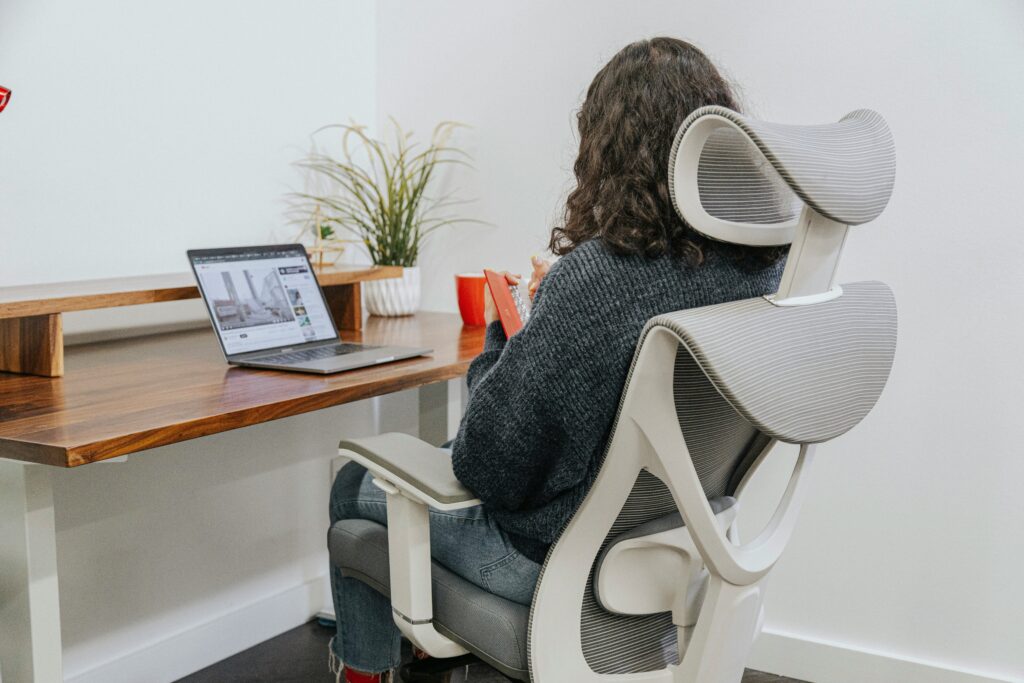
An ergonomic chair can make long workdays kinder to your body, but it helps to be clear about what it actually does. A good chair supports a healthy sitting posture and takes some of the strain out of sitting for hours. It does not, on its own, fix back problems or replace getting up and moving. With that in mind, learning how to choose an ergonomic chair for remote work comes down to two honest questions: does it fit your body, and does it fit your budget? This guide walks you through both, so you can buy what you genuinely need—and nothing you don’t.
Table of Contents
Affiliate Disclosure: This post contains affiliate links. We may earn a small commission at no extra cost to you. Prices and availability are subject to change—please check the product links for current details.
Match the chair to your priority
| If this is your priority | Consider | Investment level |
|---|---|---|
| Lumbar support that adapts as you move | Sihoo Doro C300 Pro | Premium |
| Staying cool through long sitting hours | Autonomous ErgoChair Pro | Mid-to-premium |
| Essentials done honestly on a tight budget | Staples Hyken | Budget-friendly |
| Best overall value without premium pricing | Branch Ergonomic Chair | Mid-range |
What Actually Makes a Chair Ergonomic (and What Doesn’t)
“Ergonomic” is not a regulated word. Almost any chair can carry the label, which is why it tells you very little on its own. Real ergonomics is simple: the chair adjusts to fit you, rather than asking your body to adapt to it. A truly ergonomic chair lets you sit with your feet flat, your knees and hips at roughly right angles, your lower back supported, and your shoulders relaxed.
What it doesn’t do matters just as much. A chair cannot force good posture, and it cannot cure pain. Thick padding, a bold color, or a “gaming” shape don’t make a chair ergonomic—adjustability and proper support do. If a listing leans on dramatic claims but offers no way to adjust the seat, lumbar, or armrests to your body, treat the “ergonomic” label with healthy skepticism.
Start With You: How to Choose Based on Your Body and the Way You Work
There is no single “best” ergonomic chair—only the best chair for your body and the way you work. Before comparing brands or prices, it’s worth understanding what fit actually means for you.
How to Tell If a Chair Fits You: Seat Height and the Right Seat Depth
Two measurements decide most of whether a chair fits: seat height and seat depth.
Seat height is right when your feet rest flat on the floor and your thighs sit roughly parallel to the ground, with your knees at about a 90-degree angle. If your feet dangle or your knees ride higher than your hips, the seat is too high—or you need a footrest.
Seat depth is the distance from the backrest to the front edge of the seat. To check it, sit all the way back against the backrest. You should be able to fit about two to three fingers between the front edge of the seat and the back of your knees. Too deep, and you can’t use the backrest without the seat pressing into your knees; too shallow, and your thighs aren’t fully supported. Because leg length tends to track with height, taller people usually need a deeper seat and shorter people a shallower one—which is why a seat-depth adjustment is so useful if your height falls outside the average range.
Shorter or Taller Than Average: What to Pay Extra Attention To
If you’re shorter than about 5’4″ (163 cm), look for a low minimum seat height so your feet reach the floor, a shorter or adjustable seat depth, and lumbar support that sits low enough to meet your back. A footrest is a simple, inexpensive fix if your desk forces the chair higher than your legs would like.
If you’re taller than about 6’0″ (183 cm), prioritize a high maximum seat height, a deeper seat, and a tall backrest; a headrest and a higher armrest range help too. Check the weight and height rating as well, since some chairs are simply built for a smaller frame.
If You Live With Lower Back Pain
Let’s be honest first: an ergonomic chair for lower back pain can reduce strain, but it is not a treatment. If your pain is persistent or severe, a doctor or physical therapist will help you more than any chair can
That said, the right chair can support a more comfortable sitting position instead of adding to the strain. Look for adjustable lumbar support—ideally adjustable in both height and depth—so it meets the natural curve of your spine rather than a generic spot. A seat that lets you sit all the way back, and a backrest that reclines slightly, both help; leaning back a little eases the pressure on your lower spine compared with sitting bolt upright. Even so, the most helpful thing you can do for your back is to change position and stand up regularly.
If lumbar support is your top priority and you’re prepared for a larger investment, the Sihoo Doro C300 Pro is one option worth considering. Its main draw is a dynamic lumbar support that adapts as you move rather than holding a single fixed shape.
Pros:
- Dynamic lumbar support that adapts as you move — it follows your back instead of locking to one position, which is its strongest feature for back comfort.
- Extensive adjustability — multiple adjustment points let you tune the fit closely to your body.
- Breathable mesh build — stays cool across a long workday.
Cons:
- A larger investment (around $430-610) — a real commitment that only makes sense if lumbar support is your priority.
- Heavy chair — it’s substantial to move and assemble, so choose its spot before setup.
Even so, it remains a support tool, not a cure—if your pain persists, a healthcare professional will help far more than any purchase.
Heavy Remote Work: Many Hours in the Same Chair
If you’re in the chair six, eight, or more hours a day, comfort over time matters more than comfort in the first five minutes. Breathability becomes important, because heat and moisture build up over a long sitting. A sturdy mechanism and good adjustability let you fine-tune the fit and shift between an upright and a slightly reclined position through the day.
No chair, however, is designed to hold you still for eight hours straight—getting up and moving regularly matters as much as the chair you choose.
If you run warm and want a chair built for long sittings, the Autonomous ErgoChair Pro is a reasonable fit—particularly for taller users.
Pros:
- Very breathable mesh — it stays cool through hours of continuous sitting, which is exactly what long days demand.
- Sliding lumbar support — moves to meet the curve of your back so support stays where you need it.
- Fits heights up to about 6’3″ — comfortable for taller people who often outgrow standard chairs.
Cons:
- Shorter warranty (2 years via Amazon) — less coverage than some rivals, worth weighing on a long-term purchase.
- Firm mesh seat — it can feel hard if you prefer a cushioned seat.
If you’d rather have a longer warranty or a softer seat, this may not be your match—but for staying cool over a full day, it earns its place.
The Adjustments That Truly Matter (and the Ones That Are Optional)
Adjustability is what separates a genuinely ergonomic chair from a padded one. But not every adjustment is worth paying for, and being clear about the difference will save you money.
The Non-Negotiable Adjustments
These are the adjustments that let the chair fit your body:
- Seat height — so your feet rest flat and your knees sit at about 90 degrees.
- Lumbar support — ideally adjustable, so it meets the curve of your lower back.
- Seat depth — so you can use the backrest without the seat pressing behind your knees, especially if your height is outside the average.
- Armrest height — so your shoulders stay relaxed and your elbows rest at roughly 90 degrees.
Without these, a chair can’t truly adapt to you, no matter how it’s marketed.
Nice-to-Have Adjustments You Don’t Strictly Need
These can add comfort, but they’re refinements rather than essentials:
- 4D armrests (height, depth, width, and angle) — convenient, but height alone covers most needs.
- Headrest — pleasant when reclining and helpful for taller people, less so if you sit upright.
- Adjustable recline tension and lock — nice for varying your posture, though a basic tilt often suffices.
- Seat tilt or slide — useful for some, but not something most people miss.
If you’ll genuinely use these, they’re worth it. If not, there’s no honest reason to pay a premium for them.
Mesh, Fabric, or Memory Foam: Pros and Cons by Material
The seat and back material affects comfort, temperature, cleaning, and how the chair ages. None is universally “best”—the right one depends on your room and your preferences.
Here’s a quick, honest comparison before the details:
| Material | Breathability | Initial Comfort | Durability over time | Ease of cleaning | Best for |
|---|---|---|---|---|---|
| Mesh | High | Moderate (firmer feel) | High—holds its shape | Easy—wipes clean | Warm rooms and long sitting days |
| Fabric | Low to moderate | High—soft and cushioned | Moderate | Harder—absorbs spills | Cooler rooms and a padded feel |
| Memory foam | Low | High—plush, contouring | Moderate—can compress | Moderate | Softness over coolness, shorter sittings |
No single material wins on every count; the best choice is the one that matches how warm your room runs and how you like a seat to feel.
Mesh: Pros and Cons
Pros:
- Breathable weave — air passes through it, so you stay noticeably cooler over long days.
- Responsive support — it flexes with you and springs back, with less of a “sinking” feeling.
- Easy to clean — a quick wipe handles most dust and spills.
- Holds its shape — quality mesh keeps its tension for years without flattening.
Cons:
- Firmer feel — some people find the surface or front edge harder than padding.
- Less plush — if you prefer a soft, cushioned seat, mesh can feel sparse.
Fabric: Pros and Cons
Pros:
- Cushioned comfort — padded fabric feels soft and familiar from the moment you sit.
- Comfortable in cool rooms — it holds a little warmth, which is pleasant in colder spaces.
- Widely affordable — easy to find at lower price points.
Cons:
- Limited airflow — it can feel warm or sticky during long sittings.
- Harder to clean — fabric absorbs spills and traps dust, and stains tend to show.
Memory Foam: Pros and Cons
Pros:
- Pressure-relieving contour — it molds to your shape, easing pressure points at first.
- Soft initial comfort — the plush feel is inviting and familiar.
- Even support — it distributes your weight smoothly across the seat.
Cons:
- Traps heat — foam holds body warmth and can feel hot over a full day.
- Compresses over time — it tends to flatten and lose support sooner than good mesh.
Mesh or Foam for an 8-Hour Workday?
For most people sitting eight hours, breathable mesh—or a hybrid with a mesh back and a lightly cushioned seat—tends to wear better and stay cooler. Foam usually feels nicer in the first hour but warmer and less supportive by the sixth. Still, there’s no single right answer: if your room runs cold and you value a soft seat, foam may suit you better. Choose based on your room’s temperature and how the seat feels over time, not just at first touch.
The Chair Doesn’t Work Alone: Chair + Desk + Monitor
A good chair is only one part of a larger setup. If your desk is too high or your monitor too low, even an excellent chair won’t spare your neck and shoulders.
If you’re building your workspace from scratch, Ergonomic Laptop Setup Guide: Where to Start and What to Do First is a good place to begin before fine-tuning your chair.
Getting the Right Height Between Your Chair, Desk, and Monitor
Set things up in this order to get the correct chair, desk, and monitor height:
1. Adjust the chair to your body first—feet flat, knees at about 90 degrees, hips level with or slightly above your knees.
2. Match the desk and keyboard to your elbows—your forearms should be roughly parallel to the floor with your wrists straight. If a fixed desk sits too high, raise the chair and add a footrest.
3. Place the monitor last—the top of the screen at or just below eye level, about an arm’s length away, so your neck stays neutral.
Since monitor height is part of the equation, choosing a monitor based on the specific problem you’re solving — not just size or price — is worth doing alongside your chair.
This sequence keeps each joint in a comfortable, neutral position from the ground up—targets that reflect standard workstation ergonomics guidance.
The Habits That Matter More Than Any Chair
It’s worth saying plainly: the best posture is your next one. No chair is meant to hold you in a single position all day, and no purchase replaces movement. Standing up, stretching, and changing posture every 30 to 60 minutes will do more for your comfort than any single feature. A good chair makes sitting well easier—your habits do the rest.
Real-World Budget: What to Expect at Each Price Range
Price mostly buys adjustability, material quality, and durability—roughly in that order. Here’s an honest look at each range so you can match your spending to your actual needs.
Under $150: What to Prioritize and What to Sacrifice
You can find a genuinely usable ergonomic chair under $150, but you’ll be choosing carefully. Expect seat-height adjustment, basic lumbar support, and sometimes height-adjustable armrests.
Prioritize, in this order: a seat height that puts your feet flat and your knees at 90 degrees, a backrest that supports your lower back, and a seat depth that fits you. You’ll likely give up seat-depth adjustment, multi-way armrests, premium materials, a refined recline, and a long warranty. That’s a fair trade—a well-fitting budget chair beats an expensive one that doesn’t fit your body.
One honest example in this range is the Staples Hyken. It delivers more than most chairs at its price without pretending to be premium.
Pros:
- Full breathable mesh back and seat — stays cool through long days, which is uncommon at this price.
- Synchro-tilt recline — lets you lean back and change posture instead of sitting locked upright.
- Adjustable lumbar support — gives your lower back a point of contact that many budget chairs skip.
- Entry-level price (around $120-160) — covers the essentials without straining a tight budget.
Cons:
- Basic headrest — it works, but it isn’t the chair’s strong point, and taller users may find it shallow.
- 275 lb weight capacity — fine for many, but check it against your needs first.
It’s a sensible pick if you want the essentials done honestly; if you need a higher weight capacity or a refined headrest, look further up the range.
$150 to $300: The Sweet Spot
For most remote workers, this range offers the best value. You can reasonably expect properly adjustable lumbar support, seat-depth adjustment, good-quality mesh or padding, multi-way armrests, and a sturdier build with a longer warranty. For the majority of people, the benefits start leveling off above this range.
For most people, the Branch Ergonomic Chair is a well-balanced choice in this range.
Pros:
- Seat-depth adjustment — lets you dial in the fit, which matters most if your height is outside the average.
- Wide height range (about 5’2″-6’2″) — works well across a broad span of body types.
- Breathable mesh back — keeps you cooler than a padded back over a full workday.
- 7-year warranty — a strong sign of the maker’s confidence in the build.
Cons:
- Firm seat — the cushion can feel firmer than some prefer, especially in the first weeks.
- No headrest on the standard model — fine for upright sitting, but worth noting if you recline and want neck support.
It suits the majority of remote workers well; if you sit fully reclined often or want a softer seat, weigh that before buying.
Premium Chairs: When They’re Worth It and When They’re Not
A premium chair can be worth it if you have specific needs a standard chair can’t meet—an unusually tall or heavy frame, a documented postural condition, or a genuine value placed on long warranties and lasting build quality. It’s not worth it if you’re paying mainly for a brand name, or for adjustments you won’t use. The honest rule is this: a higher price doesn’t make a chair more correct for you. A well-known, expensive chair that doesn’t fit your body is still the wrong chair.
Common Mistakes When Buying an Office Chair
A few common office chair buying mistakes are easy to avoid once you know them:
- Buying for looks — a dramatic “gaming” shape isn’t the same as ergonomic support.
- Ignoring your own measurements — the chair has to fit your height and leg length, not an average.
- Trusting the “ergonomic” label alone — if it doesn’t adjust, the word means little.
- Skipping the return policy — you won’t truly know a chair until you’ve sat in it for a few days.
- Choosing on price alone — both the cheapest and the most expensive option can be wrong for you.
- Overlooking weight and height ratings — a chair built for a smaller frame won’t serve a larger one well.
Maintenance and Durability: Making Your Chair Last for Years
Durability comes partly from the chair and partly from how you care for it. A well-maintained mid-range chair can easily outlast a neglected premium one.
Before you buy, a few signs point to a chair that will last: a warranty of several years (a sign of the manufacturer’s own confidence), a weight rating with room to spare, and replaceable parts like casters and the gas lift, so one worn component doesn’t end the chair’s life. When you’re ordering online and can’t sit in the chair first, it’s worth confirming the practical details too—how long the return window is, whether replacement parts are actually available to buy, and how difficult assembly is reported to be, alongside that warranty and weight limit.
One small but practical detail: hard plastic casters are made for carpet, while rubber or polyurethane casters roll smoothly and protect hardwood floors at home.
Once it’s yours, the upkeep is modest: tighten the bolts every few months, clean the material as its type requires, keep the casters free of hair and dust, and avoid loading the chair beyond its rating. Small, consistent care is what turns a good chair into a long-term one.
Your Quick Pre-Purchase Checklist
Before you commit, run through this short list:
- Do your feet rest flat and your knees sit at about 90 degrees within the chair’s height range?
- Can you sit fully back with about two to three fingers between the seat edge and the back of your knees?
- Is the lumbar support adjustable to the curve of your lower back?
- Do the armrests let your elbows rest at roughly 90 degrees with relaxed shoulders?
- Does the material suit your room’s temperature and your comfort preference?
- Does it include the adjustments you’ll actually use—without a premium for ones you won’t?
- Is the budget matched to your real needs?
- Are the weight and height ratings right for you?
- Is there a clear return policy and a reasonable warranty?
If you can answer yes to these, you’re making an informed choice.
Frequently Asked Questions
What adjustments are essential in a budget ergonomic chair?
Seat height comes first, so your feet rest flat and your knees sit at about 90 degrees. After that, prioritize lumbar support and adjustable armrest height. If you can only have one, choose a seat height that fits you paired with a backrest that supports your lower back.
How do I know if the seat depth is right for my height?
Sit all the way back and aim for about two to three fingers of space between the seat’s front edge and the back of your knees. If your height falls outside the average range, a seat-depth adjustment is the surest way to get this right.
Is a mesh or foam chair better for working 8 hours a day?
For most people, breathable mesh—or a mesh-back, cushioned-seat hybrid—stays cooler and holds its support longer over a full day. Foam feels softer at first but traps heat and compresses sooner. The better choice depends on your room temperature and how the seat feels to you over hours, not minutes.
Can an ergonomic chair cure back pain on its own?
No. A good chair can reduce strain and make a healthy posture easier to maintain, but it cannot cure back pain by itself. Movement, regular breaks, your overall desk setup, and—if the pain persists—a healthcare professional will help you far more than any chair alone.
Conclusion: A Smart Decision, Not an Impulse Buy
Choosing an ergonomic chair well comes down to a calm, honest process rather than a rushed purchase. Start with your own body and the way you work, look for the adjustments that let the chair fit you, pick a material that suits your environment, and set a budget around what you genuinely need. Above all, remember that the chair is a tool: it supports good habits, but it doesn’t replace them. Buy the chair that fits you, take care of it, keep moving through your day, and it will serve you well for years.
If you’d like to keep exploring, you can browse more ergonomic chairs on Amazon and find the one that fits you best.