
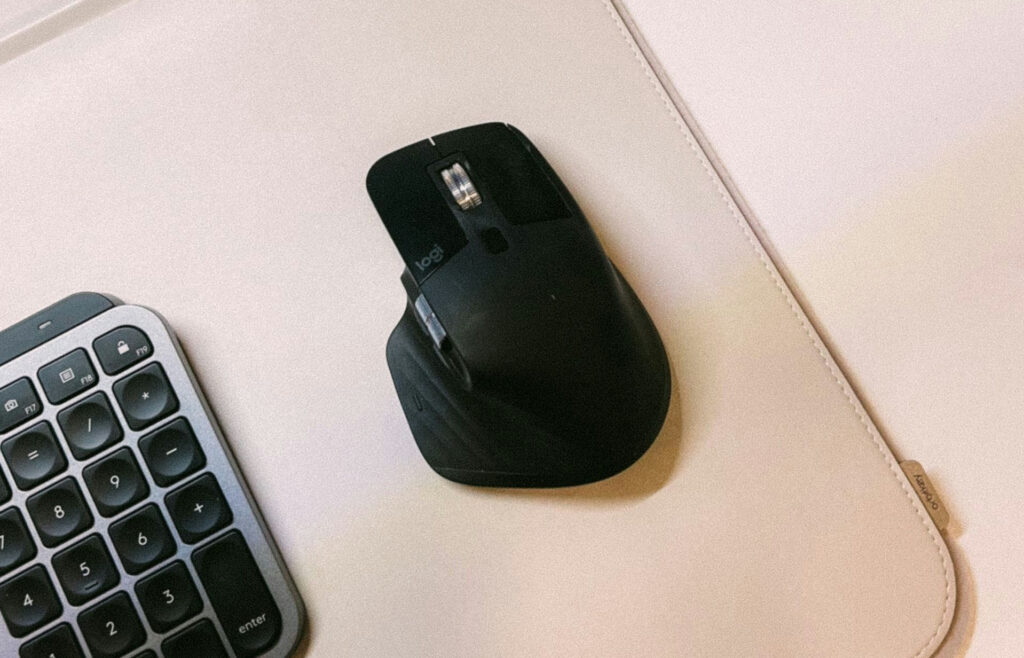
“Ergonomic mouse” gets used as if it describes one thing, but it doesn’t. A vertical mouse, a trackball, and a sculpted mouse with a thumb rest all get called “ergonomic,” and they work in almost completely different ways. Buying one because you heard it’s “more ergonomic” is a bit like buying a shoe in a random size because you heard shoes are good for your feet.
Learning how to choose an ergonomic mouse starts with understanding that different shapes solve different problems — and the shape that helps your coworker’s shoulder might do nothing for your wrist, or even feel worse. This guide walks through what each shape actually changes, how your grip and hand size affect the fit, and what the adjustment period really feels like, so you can figure out which one is worth trying before you buy it.
Table of Contents
Affiliate Disclosure: This post contains affiliate links. We may earn a small commission at no extra cost to you. Availability is subject to change—please check the product links for current details.
Why “ergonomic” doesn’t mean one shape
Choosing between a vertical vs horizontal ergonomic mouse comes down to one specific thing: whether your discomfort comes from the twisting motion of a flat grip, or from something else entirely. A traditional mouse holds your hand flat, palm down, which does two things over a long day: it twists your forearm into a position called pronation, and it can angle your wrist slightly sideways toward your pinky, known as ulnar deviation. Neither happens all at once — it’s the hours of holding that position that add up.
The three shapes below each interrupt that differently. A vertical mouse tilts your hand upright into something closer to a handshake position, which directly targets forearm pronation — the exact mechanism a vertical mouse is built to reduce, since your forearm barely has to twist at all. A trackball takes a different approach: instead of moving your whole hand and arm to move the cursor, your thumb or fingers roll a ball while your hand stays still, which can reduce the repeated reaching that tires out your shoulder rather than your wrist specifically. A contoured mouse doesn’t change your grip or your arm’s angle much — it adds a sculpted shape and a thumb rest that gives your hand more support than a flat, traditional design, without asking you to learn a new grip.
None of these are automatically better than the others. They’re different tools for different kinds of strain, which is why matching the shape to what’s actually bothering you matters more than reaching for whichever one is labeled “ergonomic” loudest.
Match your discomfort to a shape
If you’d rather skip ahead, here’s the short version:
| What you notice | What may be contributing | Shape to consider |
|---|---|---|
| Wrist twists or bends during use | Forearm pronation | Vertical |
| Shoulder or elbow tires from reaching for the mouse | Repeated arm movement | Trackball |
| Fine after typing, tense after mousing | Flat, unsupported grip | Contoured |
Grip style and hand size matter more than the label
Shape solves one kind of problem. Fit is a separate question — and it’s the one that decides whether any shape you pick actually feels right in your hand.
Before anything else, it helps to know two things about your own hand: how you naturally hold a mouse, and roughly how big your hand is. For size, measure from the base of your palm to the tip of your middle finger, then compare that number against the manufacturer’s sizing guide for whichever mouse you’re considering — it takes thirty seconds and rules out a mismatch before you buy. Most manufacturers publish an ergonomic mouse hand size chart alongside their dimensions, and it’s worth checking before you assume a popular pick will fit your hand the way it fit someone else’s. An ergonomic mouse size guide is really just that comparison, done once per mouse.
Palm grip
If your whole palm rests on the mouse and your fingers lie mostly flat, you have a palm grip — the most common style, and the one most contoured and vertical mice are actually designed around. Larger, more supportive shapes tend to feel best here, since there’s more surface for your palm to rest against.
Claw grip
A claw grip means your palm barely touches the mouse and your fingers arch up, clicking from an angle rather than resting flat. This works well with mice that have a slightly raised back and defined button edges. People searching for the best ergonomic mouse for claw grip are usually looking for exactly that: enough curve to meet arched fingers partway, rather than a flat traditional shape that leaves them hovering.
Fingertip grip
With a fingertip grip, only the tips of your fingers touch the mouse, and your palm doesn’t rest on it at all — this grip favors light, smaller mice you can move quickly with minimal contact. A large, sculpted mouse built for palm grip can feel oversized and awkward here, since most of its support goes unused.
One more thing worth checking before you buy: handedness. Some ergonomic mice, including two of the three we cover below, are built specifically for right-handed use, with left-handed options limited or unavailable. If you’re left-handed, confirm that before you commit to a specific pick, not after.
The three shapes, and what each one actually solves
Each of these addresses a different mechanism, so none of them compete with each other — you’re choosing based on which one matches your actual discomfort, not which one ranks “best.”
Vertical: for wrist and forearm strain
If your wrist twists or your forearm feels tired by the twisting itself, not just from typing, a vertical mouse is worth trying before anything else. It’s the shape most directly built to reduce forearm pronation — a vertical mouse works by turning your entire hand position roughly on its side, instead of just adding padding to the same flat grip.
Our pick: Logitech MX Vertical. Your hand tilts up onto its side here, close to how it rests when you shake someone’s hand — a real, comfortable angle, not just a token few degrees off flat. Logitech’s own testing found this reduces muscular activity by about 10% compared with a standard mouse, a specific, attributed number rather than a vague comfort claim. The sensor also needs roughly a quarter of the hand movement a traditional 1000 DPI mouse does to cover the same distance, which adds up over a full day of use. It’s built for right-hand use only, and its size fits medium to larger hands more comfortably than small ones — if your hand runs small, Logitech’s own Lift is a more compact vertical option worth comparing before committing to the MX Vertical specifically.
What we like (Pros)
- A real handshake position, not just a slight tilt: the angle goes far enough to actually ease the twist in your forearm, rather than a token few degrees that barely changes anything.
- Less hand travel for the same work: the higher-resolution sensor means smaller hand movements cover more screen, which matters over a full day of repetitive motion.
- Backed by a real, attributed number: Logitech states the 10% reduction is measured against a standard mouse, not left vague — a specific claim is easier to evaluate than a general one like “ergonomic” on its own.
What to keep in mind (Cons)
- Right-hand only: there’s no left-handed version of this specific model, so left-handed users need to look elsewhere in the vertical category.
- Sized for medium to larger hands: if your hand runs small, the shape can feel like a stretch — Logitech’s more compact Lift is worth comparing first.
Trackball: for shoulder and elbow relief
If it’s your shoulder or elbow that tires out, not specifically your wrist, the problem is likely how far and how often you’re reaching to move the mouse at all — and a trackball solves that by removing the reaching entirely.
Our pick: Logitech MX Ergo S. Your hand stays anchored in one spot while your thumb rolls the ball to move the cursor, so your arm makes essentially no repeated movement across the desk. The body tilts 20 degrees, and Logitech attributes a 27% reduction in forearm muscle activity to that tilt specifically compared with their own M650 mouse — a meaningful number, though worth knowing it’s measured against one specific model, not mouses in general. Thumb-operated control like this also tends to be the faster of the two trackball styles to adapt to — most people find a comfortable rhythm within three to five days, versus one to two weeks for a finger-operated model — though heavy daily use can develop its own thumb fatigue over time; a finger-operated trackball is the alternative if that becomes a concern.
What we like (Pros)
- Your arm barely moves at all: once your hand finds its resting spot, the cursor work happens entirely in your thumb, which is a real relief if reaching itself is what tires you out.
- Works in almost no desk space: since the mouse itself doesn’t travel, it’s a genuine option for a cramped desk or a shared workspace.
- Fast to charge, slow to need it again: a full charge lasts months, and even a one-minute top-up covers a day of use.
What to keep in mind (Cons)
- Takes real time to adapt to: expect your cursor precision to lag for a week or two while your thumb learns a motion it’s never had to do before.
- Thumb control, not finger control: heavy daily use can shift fatigue to your thumb specifically — worth watching if you already deal with thumb strain.
Contoured: an easier first step
If your wrist and shoulder feel fine most of the time but your hand feels generally tense by the end of a mousing session, you may not need a full shape change — you may just need more support than a flat, traditional mouse gives you.
Our pick: Logitech MX Master 4. This isn’t the most dramatic ergonomic shape here, and it isn’t trying to be — the sculpted body and thumb rest add real support to a grip you already know how to use, without asking you to relearn anything. That makes it a practical step for someone who wants a more supportive shape without committing to the bigger transition a vertical or trackball mouse requires. It’s built for right-hand use only, so it isn’t an option for left-handed users.
What we like (Pros)
- Almost nothing to relearn: the grip is close enough to a traditional mouse that it requires very little adjustment, unlike the other two shapes here.
- A scroll wheel that earns its keep: it shifts between a precise, clicky mode and a fast free-spin mode, which genuinely speeds up scrolling through long documents.
- Quiet enough for shared spaces: the clicks are noticeably softer than a standard mouse, which matters if you work somewhere with other people nearby.
What to keep in mind (Cons)
- The mildest change of the three: if your discomfort is significant, this is the smallest step, not a substitute for trying vertical or trackball.
- Right-hand only: there’s no left-handed version, and the sculpted shape doesn’t translate well to a mirrored grip.
What the first week actually feels like
Switching shapes comes with an adjustment period that almost nothing else mentions honestly, so here’s what to actually expect.
With a vertical mouse, the first few days feel slightly clumsy — your cursor may overshoot targets more than usual while your hand and forearm learn the new angle. Most people feel normal again within about a week of regular use, and few describe the adjustment as difficult — more just noticeable.
A trackball takes longer. Your thumb, or your fingers with a finger-operated model, is doing motion it’s genuinely never done before, and precision typically lags for one to two weeks before it catches up to what you’re used to. It’s the biggest one-time investment of adjustment among the three shapes, which is worth weighing against how much relief you actually need.
A contoured mouse doesn’t really have this problem, because the grip barely changes — there’s little to adjust to. That’s the trade-off: less adaptation, but also a smaller change in what it can actually fix.
None of this is a reason to avoid vertical or trackball mice if your discomfort calls for one. It’s just honest: expect a temporary dip in precision, not a permanent one, and give it the full week or two before deciding it isn’t for you.
Frequently asked questions
Is a vertical mouse actually better for your wrist?
Not universally — it depends on what’s actually causing your discomfort. If your wrist or forearm hurts specifically from the twisting motion of a traditional mouse, a vertical mouse addresses that directly. If your discomfort is more about your shoulder, your posture elsewhere, or how long you sit without a break, a vertical mouse alone won’t resolve it.
How long does it take to get used to a vertical mouse?
Most people adjust within about a week of regular use. The first few days can feel a little clumsy as your hand learns the new angle, but it’s rarely described as a difficult transition — more of a noticeable one.
Who should not use a vertical mouse?
Anyone who needs high precision immediately, such as for detailed design or photo editing work, may find the adjustment period frustrating in the short term. People with very small hands may also find standard-size vertical models feel oversized, though more compact versions exist.
Does a vertical mouse help with forearm fatigue?
It can, when the fatigue comes from forearm pronation — the twisting motion a traditional mouse forces your arm into for hours at a time. A vertical mouse reduces that twist by design, which is why it’s the shape most directly aimed at forearm-specific strain rather than shoulder or elbow discomfort.
How do I know what size ergonomic mouse I need?
Measure from the base of your palm to the tip of your middle finger, then check that measurement against the manufacturer’s size guide for the specific mouse you’re considering. It only takes a moment and prevents buying a shape that’s technically right for you but sized wrong.
Which is better, a trackball or a vertical mouse?
In the trackball vs vertical mouse comparison for wrist strain specifically, the honest answer is that neither is universally better — they target different kinds of strain. A vertical mouse eases the twisting in your forearm and wrist; a trackball removes the repeated arm movement that tires out your shoulder and elbow. The right one depends on where your discomfort actually is.
The bottom line
There’s no single “most ergonomic” mouse — there’s the shape that matches your hand, your grip, and whichever part of you is actually complaining. If it’s your wrist or forearm, start with vertical. If it’s your shoulder or elbow, start with trackball. If nothing hurts yet but a flat mouse leaves your hand tired, the contoured option is the easiest place to begin.
If your wrist still needs support during typing pauses even after switching shapes, that’s a separate fix — our guide to wrist rests for keyboard and mouse covers that piece specifically.
None of this requires owning all three — pick the one shape that matches what’s actually bothering you, and give it the week or two it takes to feel normal.
If none of these three quite fit your hand or your budget, you can browse more ergonomic mice on Amazon using the same rule: match the shape to the strain, not the label.